How to Integrate WhatsApp Business API
Introduction
WhatsApp has become one of the most effective communication methods to engage with customers. However, as your business grows you may find it difficult to manually manage your customer communications through the WhatsApp Business App. To overcome this you may need to involve multiple agents, utilize automation, notify your customers, run marketing campaigns, integrate with CRM and manage your conversations better.
This is where the WhatsApp Business API can help.
The WhatsApp Business API enables businesses to connect WhatsApp to their business software, CRM and website etc. Whether you’re a startup, SME, e-commerce, education or enterprise business knowing how to integrate WhatsApp Business API can help you create a more efficient communication system.
In this guide we’ll show you everything you need to know to get started. Including requirements, setup, registering a number, creating templates, integrating the API, automations and common mistakes.
What is WhatsApp Business API?
The WhatsApp Business API is a business communication interface allowing you to send and receive messages via WhatsApp within software applications. Unlike the WhatsApp Business App the API is not a mobile application. It acts as a bridge between WhatsApp and your business software or WhatsApp Business API Provider.
Within the WhatsApp Business API you can:
- Manage multiple agent conversations.
- Send Approved Templates.
- Automate customer communications.
- Send eligible order and service notifications.
- Create chatbots and automate your workflows.
- Connect WhatsApp to your CRM/ERP.
- Send and receive messages with APIs.
- Track your messaging.
Requirements
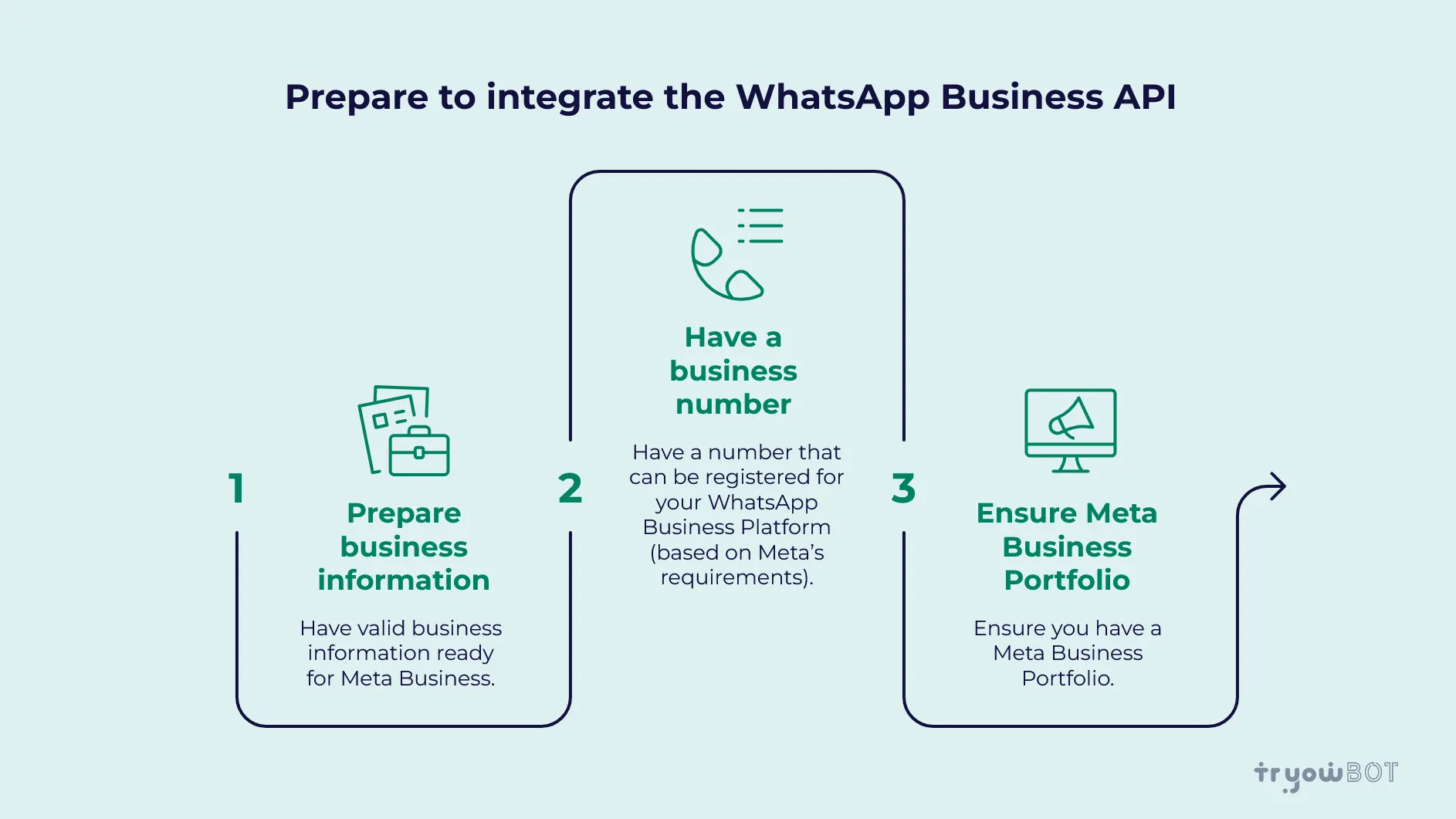
To begin integrating the WhatsApp Business API you’ll need:
Business Information
Have valid business information ready for Meta Business.
Business Number
Have a number that can be registered for your WhatsApp Business Platform based on Meta’s requirements.
Meta Business Portfolio
Ensure you have a Meta Business Portfolio.
WhatsApp Business API Provider
Work with a WhatsApp Business Solution Provider, or a platform that can help you onboard, manage and integrate the WhatsApp Business Platform.
Business Use Case
Decide how you’re wanting to use WhatsApp.
- Customer Support
- Lead Generation
- Marketing
- Order Notifications
- Appointment Reminders
- OTP and Authentication
- Customer Automations
Having a clear idea of how you’re wanting to use WhatsApp will make it easier to plan your integration.
How to Integrate WhatsApp Business API
Depending on your provider and business requirements the setup will vary slightly. However the general process includes:
Select a WhatsApp Business API Provider
The first thing to do is choose a suitable WhatsApp Business API provider. When choosing a provider compare different options based on:
- Cost
- API access
- Shared Inboxes
- Chatbots
- Broadcasts
- CRM
- Analytics and Reporting
- Customer Support
- Scalability
Choose a provider based on your current and future business requirements.
Create a Meta Business Portfolio
Create or use your existing Meta Business Portfolio. You may need to provide some business information and complete the verification process.
Verifying your business will help confirm who you are as a business and give you access to the relevant Meta Business items.
Create/Connect WhatsApp Business Account
Next, you’ll need to create or connect your WhatsApp Business Account. Your provider can assist you through the onboarding process and connect your WhatsApp Business Account to the relevant platform.
Register a Phone Number
Register your phone number for your WhatsApp Business Platform. Generally you’ll need to verify your number. This usually involves receiving a code via the verification method. Ensure the number is available during setup.
Setup WhatsApp Business Profile
Setup your business information. Depending on your setup this may include:
- Business Name
- Business Description
- Business Category
- Business Email
- Business Website
- Business Profile
Having full business information will help customers identify who you are.
Create WhatsApp Message Templates
If you’re looking to send business initiated messages you’ll generally need approved WhatsApp message templates. You can create various templates for your business based on your requirements. For example:
- Promotions
- Order Confirmation
- Delivery Updates
- Appointment Reminders
- Payment Notifications
- Customer Follow Ups
- Authentication
Create your templates based on Meta’s relevant template and message policies.
Connect WhatsApp API to Business Software
Now you can connect WhatsApp to your website, CRM, ERP, mobile application or other systems. Depending on your requirements you can:
- API Integration: Connect your business application directly to the WhatsApp APIs.
- Webhooks: Receive incoming messages and delivery events in your application.
- CRM Integration: Connect your WhatsApp communications to your customers.
- Third Party Integrations: Use any third party integrations provided by your WhatsApp API platform.
Setup Automations
Once your API is setup you can create automations. For example:
- Welcome Message
- Lead Follow Up
- Appointment Reminder
- Order Notification
- Delivery Update
- Customer Support FAQ
- Lead Assignment
This can help reduce any repetitive tasks and help you respond to customers quicker.
Test
Before using WhatsApp API to communicate with customers make sure you’ve fully tested your setup. Check:
- Messages are being sent.
- Templates are working with variables.
- API responses.
- Webhook Events.
- Customer Replies.
- Automations.
- CRM Sync.
This will help you identify any issues with your setup.
Communicate with Customers
Once you’ve successfully tested your setup your business can start communicating with customers. Start by sending a small amount of messages and monitor your account, delivery, customer replies and campaign performance.
Integration Options
API Integration
If you have a development team you can integrate WhatsApp directly into your application. This provides more control however may require you to have development resources.
Provider Based
Use a WhatsApp Business API provider. This can help you onboard, run campaigns, automate and provide customer support.
CRM Integration
Integrate WhatsApp with your CRM.
Website Integration
Integrate WhatsApp with your website to enable customers to begin conversations or trigger actions within your business.
Common Use Cases
- Customer Support: Manage customer enquiries.
- Lead Generation: Capture leads and automatically begin eligible communications.
- Marketing: Send approved promotional templates to opted-in customers.
- Order Updates: Send order confirmation, payment and delivery notifications.
- Appointment Reminders: Send appointment confirmation and reminders.
- Education: Send admission updates, class and event information.
- E-commerce: Integrate WhatsApp with online stores and customer support.
- CRM Automations: Automatically update your customer records and trigger relevant actions.
Benefits
Integrating WhatsApp Business API can provide many benefits to your growing business. These include:
- Centralised Communication: Manage your customer communications from a connected Business Platform.
- Multiple Agents: Multiple people can manage customer conversations.
- Automations: Reduce repetitive tasks with automations and chatbots.
- Faster Customer Response: Respond to customer enquiries and notifications quicker.
- CRM Integration: Enable customer communications with sales.
- Scalable Communication: Create communication workflows that can scale with your customers.
- Improved Customer Experience: Provide timely and personal communication on a channel they use.
Common Mistakes
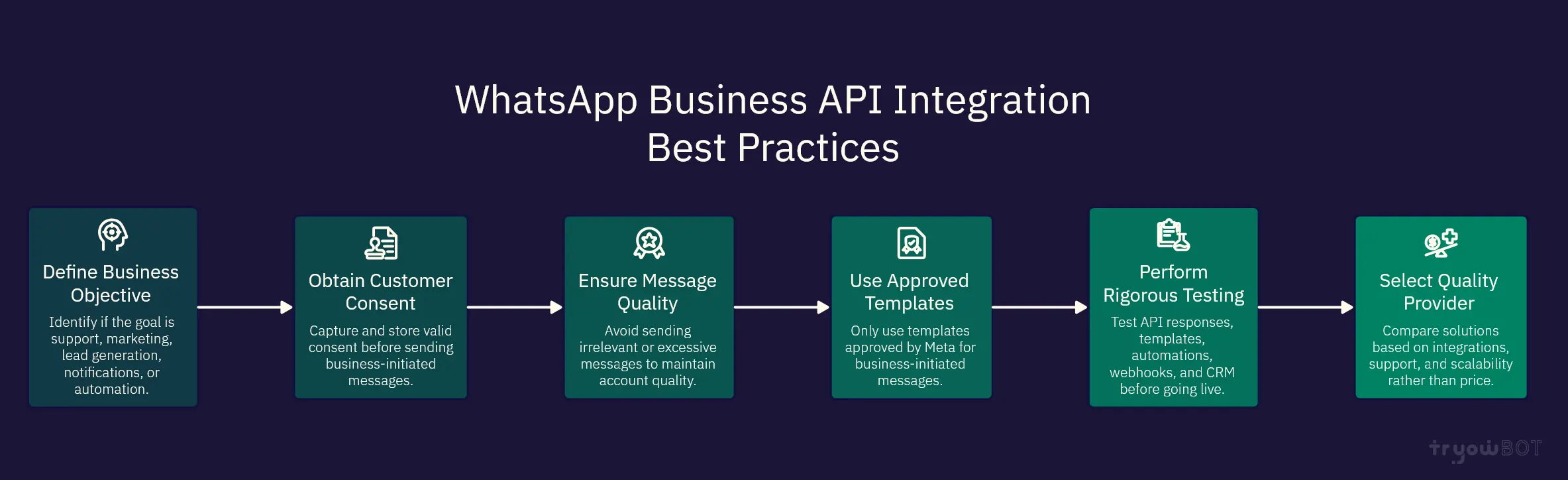
No Clear Business Objective
Ensure you have a clear objective for using the API. Are you looking to provide customer support, marketing, lead generation, notifications or automation?
No Customer Consent
Ensure you capture and keep the correct customer consent before sending business initiated messages.
Poor Quality Messages
Sending irrelevant or too many messages can impact your customer experience and overall account quality.
Unapproved Templates
Only use approved templates for sending business initiated messages based on Meta requirements.
No Testing
Always test your API responses, templates, automations, webhooks and CRM. Never go live without testing.
Don’t Choose a Cheap Provider
Choosing a cheap provider may mean you won’t have the integrations, automations, support and scalability you need. Compare the whole solution.
Why TryowBOT?
TryowBOT provides a centralised platform for businesses looking to manage their WhatsApp communications, automations, campaigns and CRM activities. With TryowBOT businesses can:
- Manage customer conversations using a Shared Team Inbox.
- Create and manage WhatsApp message templates.
- Send WhatsApp Broadcast Campaigns.
- Use Dynamic Broadcasts.
- Create automations using the Automation Module.
- Connect to business systems using API.
- Capture and manage leads using CRM.
- Track customer activity.
- Manage customer follow ups and sales.
This makes it ideal for businesses looking to use WhatsApp with automations and CRM.
How Long Does it Take to Integrate?
The time taken to integrate will depend on your setup and what type of integration you’re looking to perform. A basic provider based integration may be quicker than a custom integration with CRM, ERP, website or mobile application.
Factors that can affect your integration include:
- Meta Business Verification
- Phone Number Registration
- Template Approval
- CRM/ERP Integration
- Custom API Development
- Chatbot Setup
- Testing
Planning your requirements will help reduce any unnecessary delays.
Conclusion
Understanding how to integrate WhatsApp Business API is important if you’re looking to take your WhatsApp communications further and include automations, multiple agents, CRM and scalable customer engagement. Generally the process will include choosing a provider, setting up your Meta Business Portfolio, registering a business number, creating approved templates, connecting your business software, setting up automations and testing your full process.
Having the correct setup can help reduce manual tasks, respond to customers quicker, reduce repetitive communications and manage your customer relationships. If you’re looking for an easy way to integrate WhatsApp Business API TryowBOT offers WhatsApp messaging, Broadcast Campaigns, automations, API and CRM. Get started with integrating WhatsApp Business API today and bring your customer conversations into an organised and automated process.