Introduction
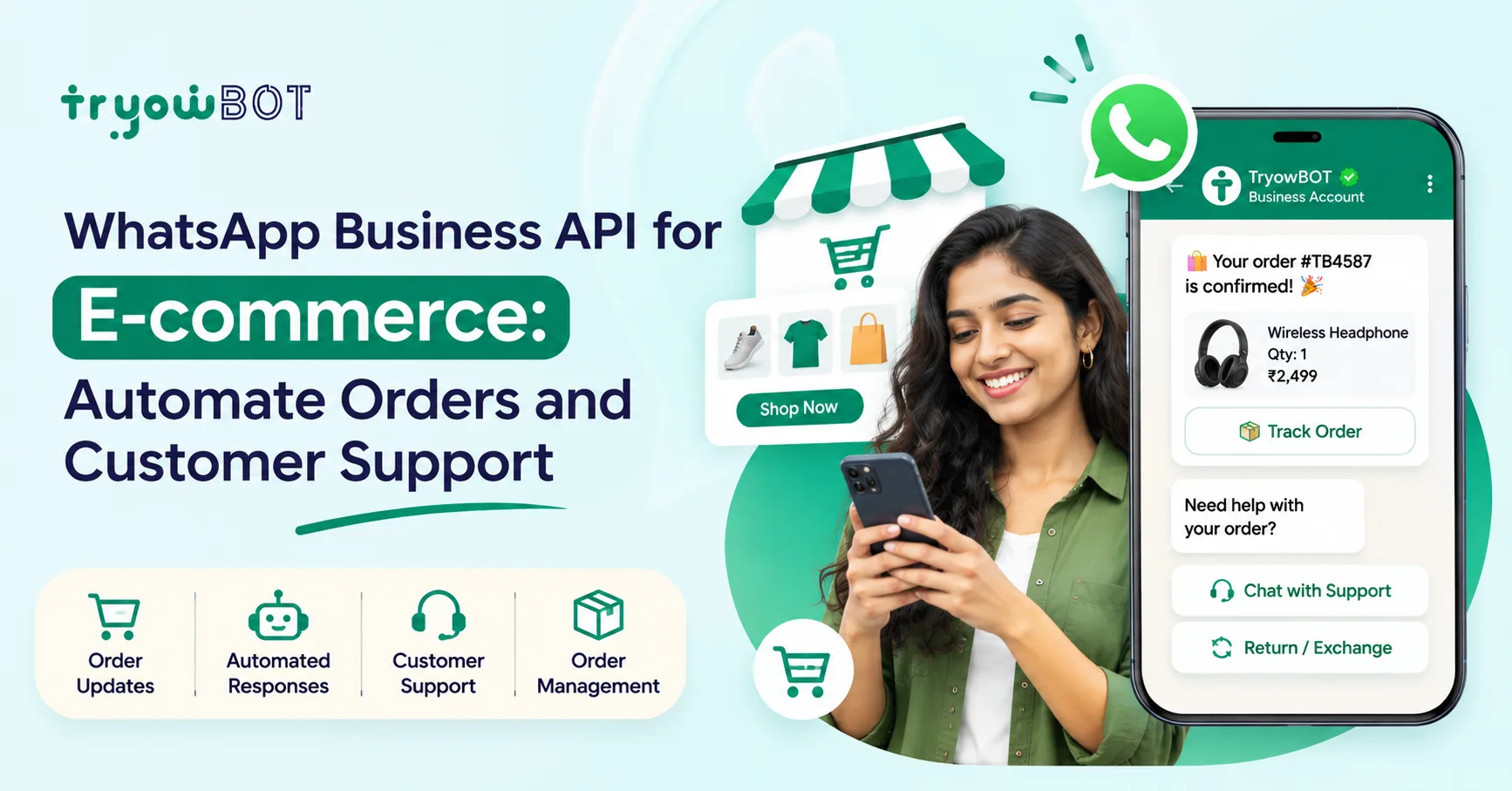
E-commerce businesses communicate with many customers on a daily basis. From confirming orders, informing about payments, shipping orders, asking questions about deliveries, returns and product queries. As a business grows it can become time consuming and challenging to manage these conversations. Using the WhatsApp Business API for your e-commerce can help.
The WhatsApp Business API can be integrated with your e-commerce website, online store, CRM, order management system and other business tools. This means you can easily send notifications, reply to customer queries, manage conversations and provide support through WhatsApp.
You can automate the WhatsApp messages sent to customers throughout their journey. From confirming orders to delivery.
In this guide we will explain how the WhatsApp Business API can be used within e-commerce, what features it offers, use cases, how it can be integrated, benefits and how it can improve your customer communication.
What is WhatsApp Business API for E-commerce?
WhatsApp Business API is a messaging solution that allows businesses to send and receive messages through WhatsApp.
Within e-commerce this can be integrated with:
- E-commerce websites
- Online stores
- CRM
- Order management system
- Payment systems
- Inventory systems
- Customer support software
- Marketing automation
For example, when a customer places an order on your e-commerce site you can automatically send them a confirmation message.
Hi {{1}}, your order #{{2}} has been confirmed.
Thank you for shopping with us! Your order will be processed soon.
Later you can also send shipping, delivery, payments and support messages.
This removes the need for employees to manually send messages.
Why is the WhatsApp Business API important for e-commerce?
Customer communication is an important part of e-commerce. Customers will usually expect a quick response to their queries such as:
- Has my order been confirmed?
- Have they received payment?
- When will my order be sent?
- Where is my package?
- When will it arrive?
- Can I change my delivery address?
- How can I return the product?
- Can I exchange my order?
- Is a specific product available?
If they need to wait for an email or call to get a response it can become frustrating. Using the WhatsApp Business API can help automate many of these communications.
Key Use Cases for WhatsApp Business API in E-commerce
Order Confirmation
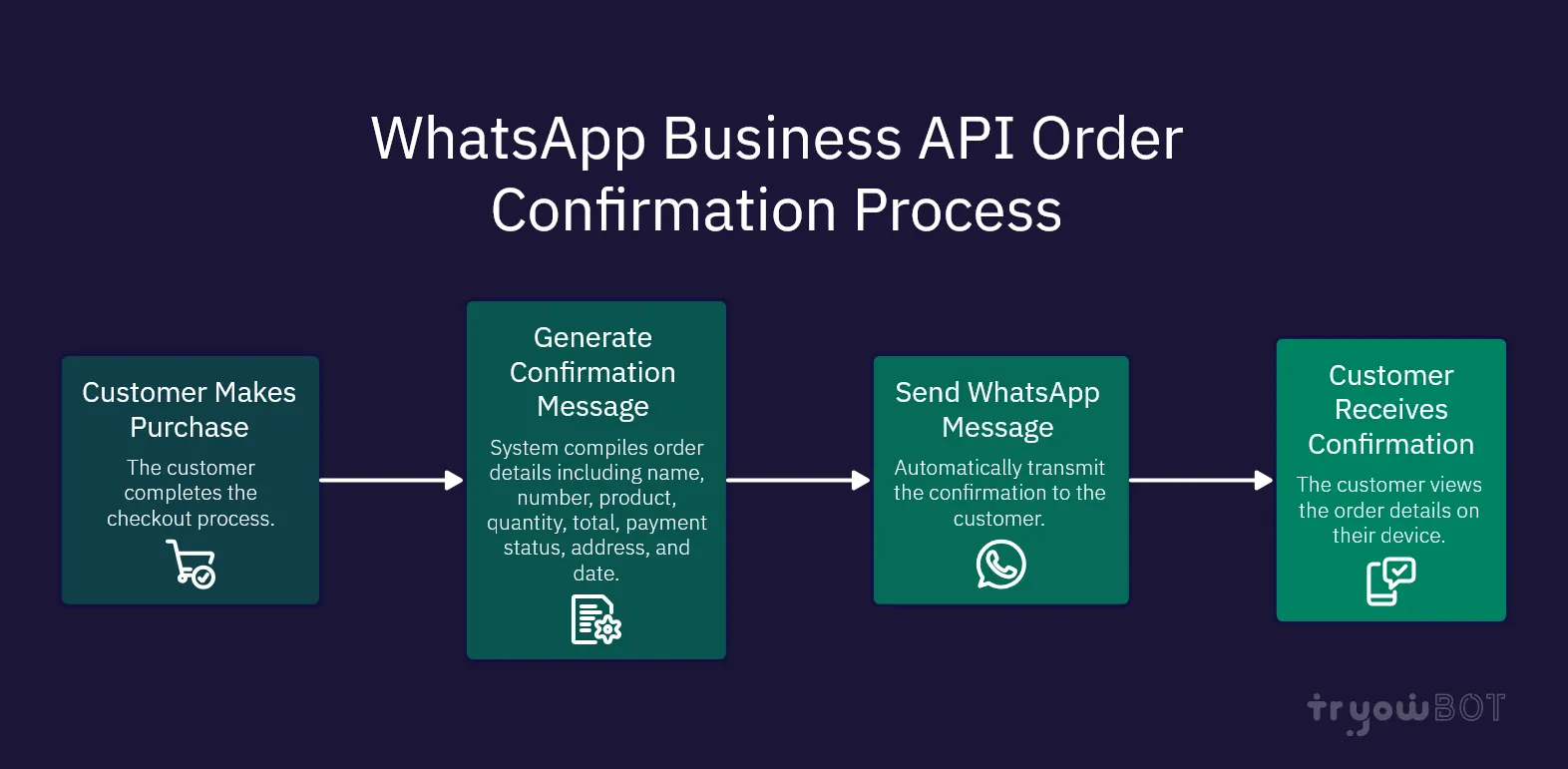
Once your customer has made a purchase you can automatically send them a confirmation message.
This can include:
- Customer Name
- Order Number
- Product
- Quantity
- Total
- Payment Status
- Delivery Address
- Expected Delivery Date
Your order #ORD12345 has been confirmed.
Product: Premium Coffee Pack
Quantity: 2
Total: ₹1,299
Payment Status: Paid
Thank you for shopping with us!
This instantly confirms to the customer they have made an order.
Payment Confirmation
Once a payment has been made you can send automatic messages.
Payment for your order #ORD12345 of ₹1,299 has been successfully received. Thank you for your purchase!
This can help reduce confusion and reduce the need for customer support.
Shipping/Dispatch Confirmation
Customers often want to know when their order has been sent. You can send automatic messages such as:
Order Packed
Your order #ORD12345 has been packed.
Order Shipped
Your order #ORD12345 has been shipped. You can track your delivery using the link below.
This can inform your customers without them having to contact you.
Order Tracking
You can use WhatsApp to let your customers know about their delivery. Include the tracking number and a button or link to take them to the tracking page.
Your order #ORD12345 is on its way. You can track your order using the button below.
This makes it easy for customers to check the status of their order.
Delivery Confirmation
You can send messages to let customers know when their order is out for delivery.
Out for Delivery
Your order #ORD12345 is out for delivery and should arrive today.
Delivered
Your order #ORD12345 has been delivered. Thank you for shopping with us!
This helps keep customers informed.
Customer Support Automation
Customers will often ask many repeated questions. Using the WhatsApp Business API can help with automating replies to common questions.
Customer: Where is my order?
Automated Reply: Please enter your order number to check the status of your most recent order.
This will then integrate with your order management system to give the correct information.
Common automated customer support queries include:
- Order status
- Delivery Status
- Payment Status
- Returns
- Exchanges
- Cancellation
- Availability
- Store information
- Shipping information
- FAQ
Cart Abandonment
Sometimes customers will add items to their basket but not make a purchase. Using WhatsApp automation you can send the correct message based on your marketing and messaging permissions.
Hi {{1}}, there are items in your basket. If you would still like to make a purchase you can click the button below to go back to your basket.
This can help businesses recover lost sales.
Product Queries
Customers may want extra information before they make a purchase. You can use WhatsApp to answer questions such as:
- Availability
- Price
- Specifications
- Sizes
- Colours
- Delivery
- Warranty
Stock Availability
You can also integrate WhatsApp with automation to guide customers to the right product.
Returns & Exchanges
Returns and exchanges are common within e-commerce. Rather than asking customers to find the return process you can use guided WhatsApp messages.
Customer: I want to return my order.
WhatsApp: Of course! Please select the order you want to return.
This can then gather the necessary information and direct to the correct support team.
Customer Feedback
Once an order has been delivered you can ask for feedback.
Thank you for shopping with us! We hope you enjoyed your purchase. Please leave us some feedback.
This can help businesses understand how satisfied their customers are and improve their products/services.
Features of WhatsApp Business API for E-commerce
Setting up your WhatsApp Business API can help with many communication needs for your e-commerce business.
| Feature How it can help your E-commerce Business | |
| Automated Messaging | Send order and customer updates |
| Templates | Send approved messages from your business |
| Team Inbox | Manage customer conversations |
| Automation | Reply to common customer queries |
| Broadcasts | Communicate with specific customer groups |
| Dynamic Messaging | Personalise your customer messages |
| Integration | Integrate with your e-commerce systems |
| CRM Integration | Manage customer information |
| Buttons | Quick actions for customers |
| Lists | Show list of options |
| Media Messages | Send media related to products/support |
| Analytics | Monitor your communications and campaigns |
Integration of WhatsApp Business API for E-commerce
The WhatsApp API will become more useful when integrated with your current systems. A typical setup could be:
Customer > E-commerce Website > Order System > WhatsApp API > Customer
For example:
- Customer makes an order.
- Order is recorded on the e-commerce platform.
- Order triggers the WhatsApp API.
- WhatsApp sends the approved message.
- Customer receives the order update.
This can be used for shipping, delivery, payments and other automated messages.
How to Integrate WhatsApp Business API into Your E-commerce Business
Choose a WhatsApp Business API Provider
You can work with a WhatsApp Business Solution Provider or choose a suitable platform to use the WhatsApp API. Consider the following when choosing a provider:
- API
- Automation
- CRM
- Team Inbox
- Templates
- Broadcast
- Customer Support
- Cost
- Analytics
Set up your Business
Complete the required setup for your Meta business and WhatsApp Business Account. Depending on your setup you may need to verify your business and register your phone number.
Set up your WhatsApp Number
Set up a business phone number to use with the WhatsApp Business API. Once set up you can manage your WhatsApp communications through your API platform.
Create Templates
Create templates for various customer communications. This could include:
- Order Confirmation
- Payment Confirmation
- Shipping Update
- Delivery Confirmation
- Appointment/Service Confirmation
- Customer Support
Ensure the templates follow WhatsApp policies and the correct category.
Integrate with your E-commerce Platform
Integrate the API with your website, e-commerce platform, CRM or order management system. For example:
New Order > API Trigger > WhatsApp Template > Customer
This will automatically send the message.
Create Automation
Create automation based on customer actions. For example:
- Order Created → Send Order Confirmation
- Order Packed → Send Shipping Update
- Order Shipped → Send Tracking Info
- Out for Delivery → Send Delivery Confirmation
- Request Feedback
This creates a structured customer journey.
WhatsApp Business API vs Traditional E-commerce Customer Support
| Traditional WhatsApp Business API | |
| Manual updates | Automated updates |
| Customer calls to check order status | Customer gets updates |
| Email based | WhatsApp based |
| Repeated support | Automated replies |
| Multiple channels | Centralised on WhatsApp |
| Manual follow ups | Automated processes |
| Lack of personalisation | Dynamic customer info |
The aim is not to completely replace human customer support but to automate repeated interactions so your support team can focus on more complex issues.
Benefits of WhatsApp Business API for E-commerce
Faster Communication
Customers will receive important updates quickly.
Reduce Manual Work
Automated messages reduce the need for employees to send repeated messages.
Increased Visibility
Customers will receive updates at various points of the order.
Improved Customer Experience
Sending timely information can make the purchase and post purchase process easier.
Centralised Communications
All customer communications can be managed through a team inbox or CRM.
Improved Team Efficiency
Your support team can focus on more complex issues rather than repeatedly answering simple questions.
Scalability
As you get more orders automation can help you manage more customer interactions.
Personalisation
You can use customer and order information to create more relevant messages.
Best Practices for WhatsApp Business API for E-commerce
Be Relevant
Messages should have a clear purpose and provide useful information.
Don't Overdo It
Don't send too many messages. Ensure you follow the correct WhatsApp policies and obtain customer permission.
Be Personal
Include relevant information such as the customer name, order number, product and delivery status.
Be Clear
Customers should understand why they are receiving the message.
Use Automation Wisely
Automate repeated processes but ensure customers can contact a human agent.
Monitor Message Quality
Monitor how customers are responding, how messages are being delivered, quality of templates etc.
Keep Customer Information Up to Date
Having accurate customer and order information is important to ensure the correct messages are sent.
Common Mistakes to Avoid
Sending Marketing Messages
Order confirmation, shipping updates and marketing campaigns should be sent under the correct category. Ensure you follow the correct policies.
Too Much WhatsApp
Sending too many unnecessary messages can impact your customers.
No Human Support
Don't make it impossible for customers to contact a support representative.
Poor Quality Templates
Ensure your templates are clear, relevant and match the purpose.
Not Integrating Order System
If you don't integrate with the actual Order System you may have to manually update order information.
Why Choose TryowBOT for E-commerce WhatsApp Automation?
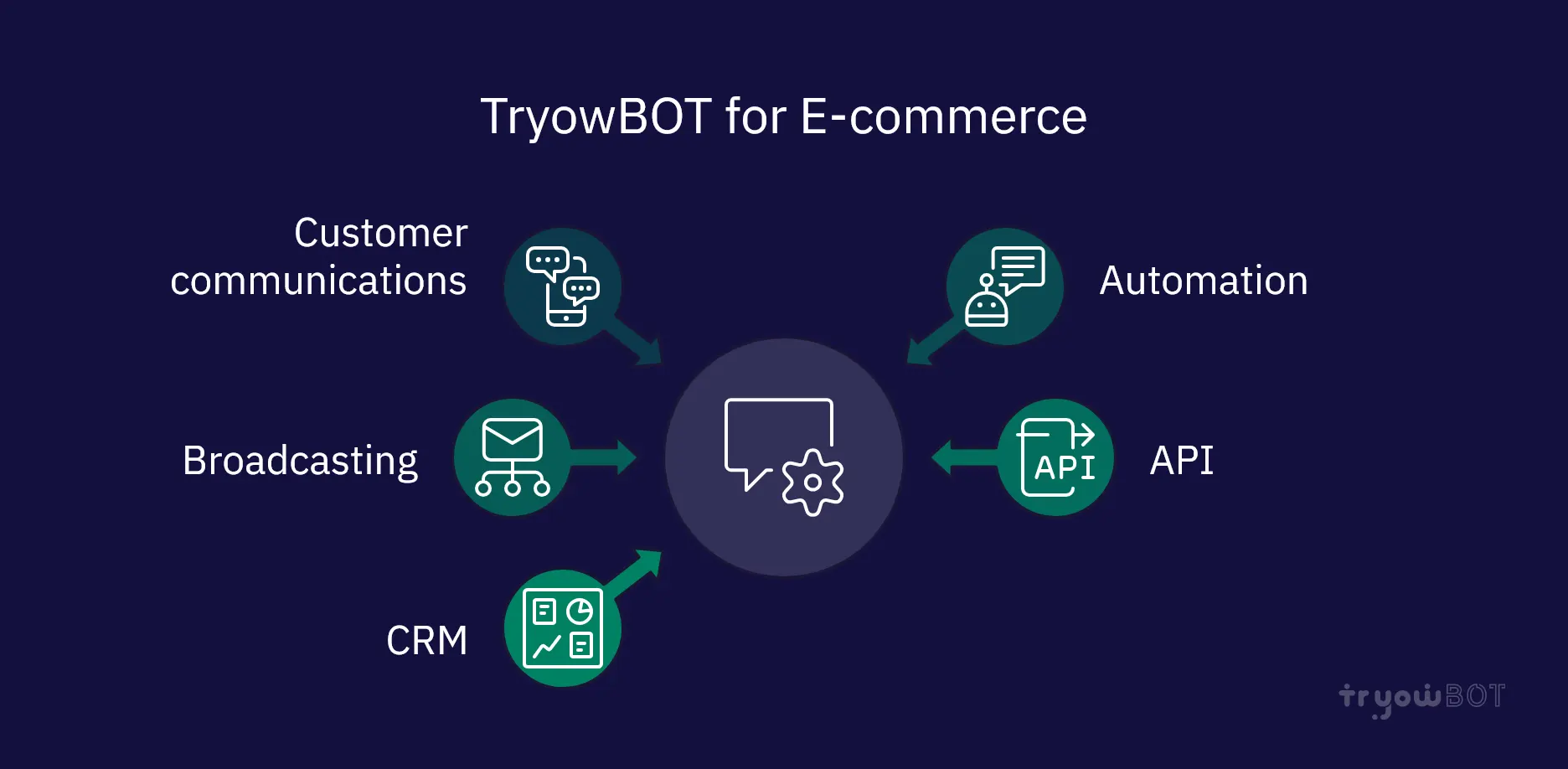
When using WhatsApp for your e-commerce business it can become more valuable if you can manage your messaging, automation and customers from one platform. TryowBOT offers features to help with business communications through WhatsApp. This can help with customer communications, automation, broadcasting, API and CRM.
With the correct setup you can manage:
- Customer Queries
- Order Communications
- Automated follow ups
- Customer Segmentation
- Team Handling
- Lead Management
- API Messages
- Customer Support
- WhatsApp Campaigns
TryowBOT CRM can also be used if you want to use WhatsApp communications alongside your customer management.
Is WhatsApp Business API suitable for small e-commerce businesses?
Yes! The WhatsApp Business API is not just for large online stores. Small and growing e-commerce businesses can use it to automate repeated communications.
For example, a small business may start with:
- Order Confirmation
- Shipping Update
- Delivery Confirmation
- Customer Support
As they grow you can add more automation for:
- Abandoned Carts
- Product Queries
- Customer Segmentation
- Feedback
- CRM follow ups
- Marketing
Conclusion
E-commerce businesses will need to effectively communicate with their customers quickly. The WhatsApp Business API can help you automate important customer interactions. From order confirmation, payment updates, shipping updates, tracking, customer support and post purchase. WhatsApp can become an important part of your e-commerce communication strategy.
The main benefit is creating a structured communication journey for your customers to receive the correct information at the right time. If you are looking to reduce manual support, improve customer communication and integrate WhatsApp with your business systems the WhatsApp Business API can be a valuable part of your digital strategy.