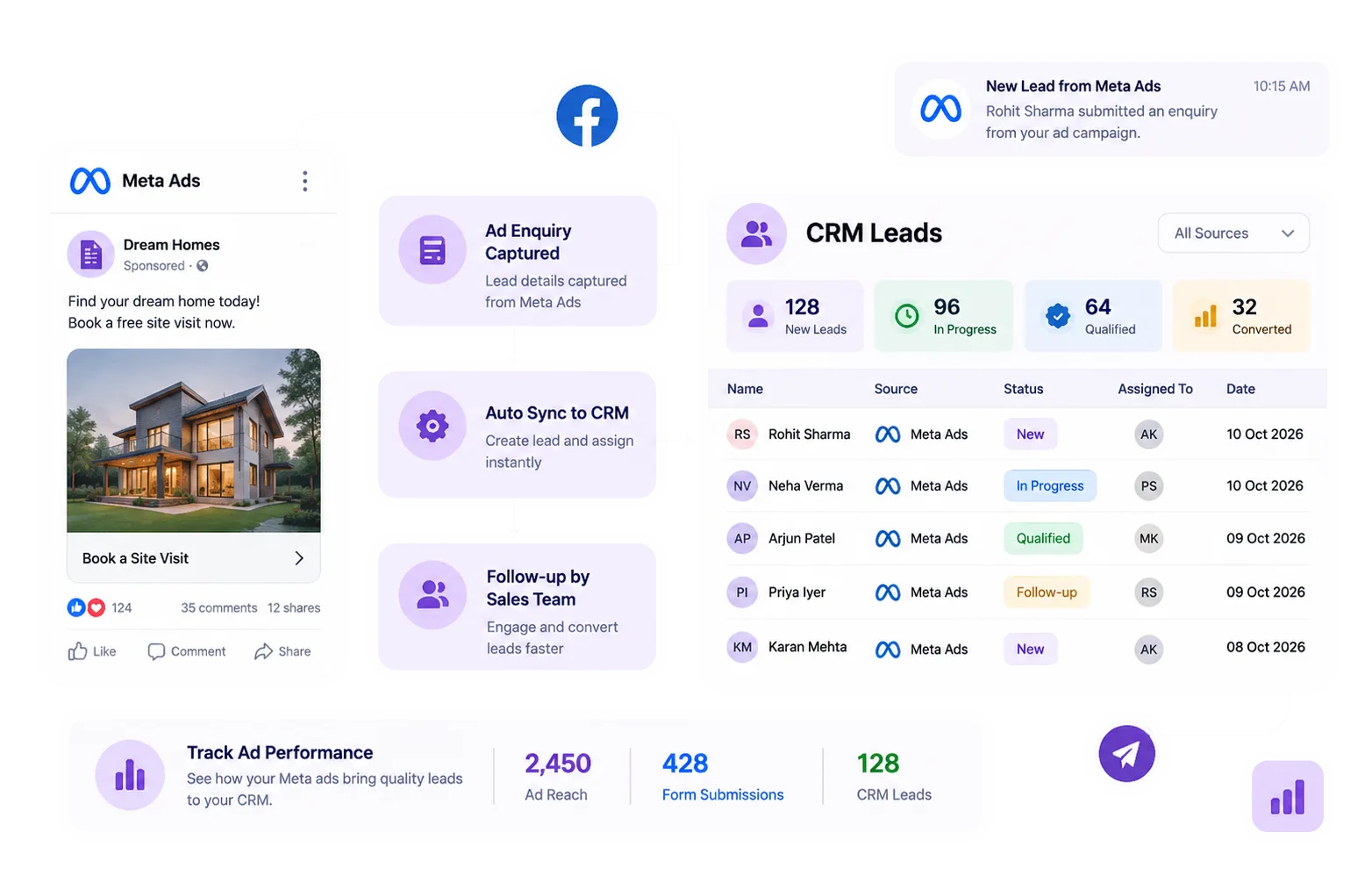













Meta Ads Leads Management

Every Meta Lead Has a Sales Story. Keep It Moving.

Bring Meta Ad enquiries into TryowBOT CRM and give every lead a clear path from first contact to follow-up, sales pipeline, and conversion.

Turn Every Lead Into a Clear Sales Opportunity

Trusted by Growing Businesses

Helping businesses simplify CRM, sales, and customer management.
A2C House of Kurtis women's ethnic wear
AARA Homemade Skincare products
Ampere Pro Engineering Technology Pvt Ltd
Avatar Financial Group financial services
Avira Organics natural health food products
CARE Dental Hospital dental care services
Cash Bazzar loan for multiple loan services
CrestLuxe Realty real estate services
Ekatrika Ventures laundry and dry cleaning services
Family Medicals pharmacy and healthcare
kottakkal farook arts and science college education
Maruthi School of banking training and education
Surgical Shop medical equipment and surgical supplies
Yamaha motorcycles and bikes
Royal Enfield motorcycles and bikes
Why Meta Ads + TryowBOT CRM

From Meta Lead to Customer Conversation — Keep Every Step Connected.

Bring Meta Ad enquiries into TryowBOT CRM and keep the sales journey organized across lead capture, assignment, follow-ups, and pipeline stages.

01

Capture Every New Enquiry

Bring Meta-generated enquiries into TryowBOT CRM with the available lead information ready for your sales team.

02

Give Every Lead an Owner

Assign each enquiry to the right salesperson and keep ownership clear throughout the sales process.

03

Keep the Sales Journey Moving

Keep follow-ups, activities, lead status, and pipeline progress together as each enquiry moves toward conversion.

From Meta Lead to Sales Opportunity — Keep Every Step Connected.

Bring leads from Meta Ads into TryowBOT CRM, assign them to your sales team, continue follow-ups, and send meaningful conversion events back to Meta through CAPI.

Meta Ads + TryowBOT CRM

From Meta Lead to Sales Opportunity — Keep Every Step Connected.

Bring leads from Meta Ads into TryowBOT CRM, assign them to your sales team, continue follow-ups, and send meaningful conversion events back to Meta through CAPI.

01

Run a Meta Ad

Run Meta Lead Ads and bring new customer enquiries into your sales process.

02

Capture & Assign

Bring the new lead into TryowBOT CRM and assign it to the right sales representative.

03

Follow Up & Close

Continue calls, messages, tasks, and activities as the lead moves through sales stages.

04

Feed Meta Back

Send relevant lead and sales conversion events back to Meta through Conversion API.

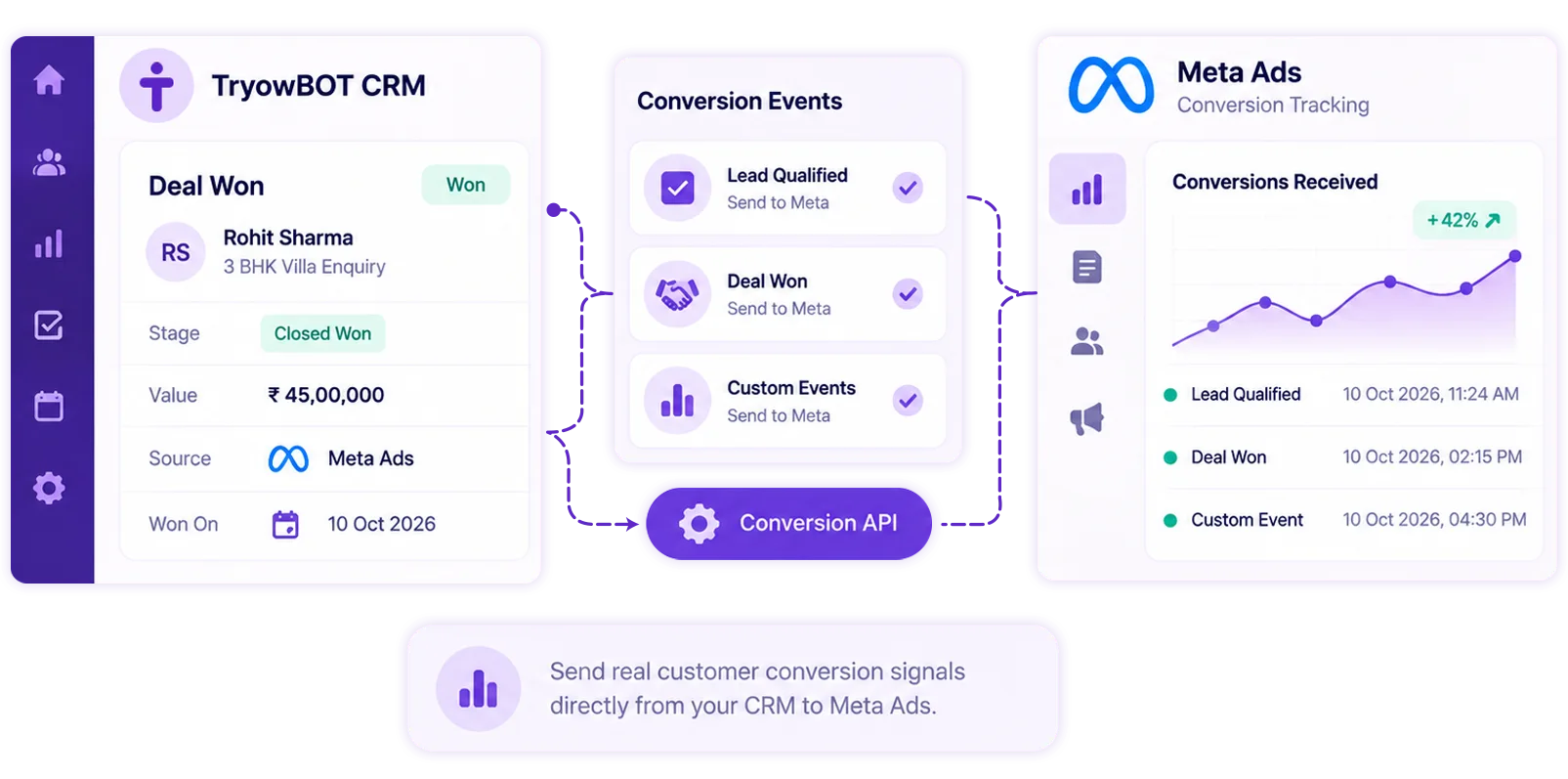
Meta Conversion API with TryowBOT CRM

Send important CRM conversion events back to Meta through CAPI, keeping your lead journey connected from the initial enquiry through sales conversion.

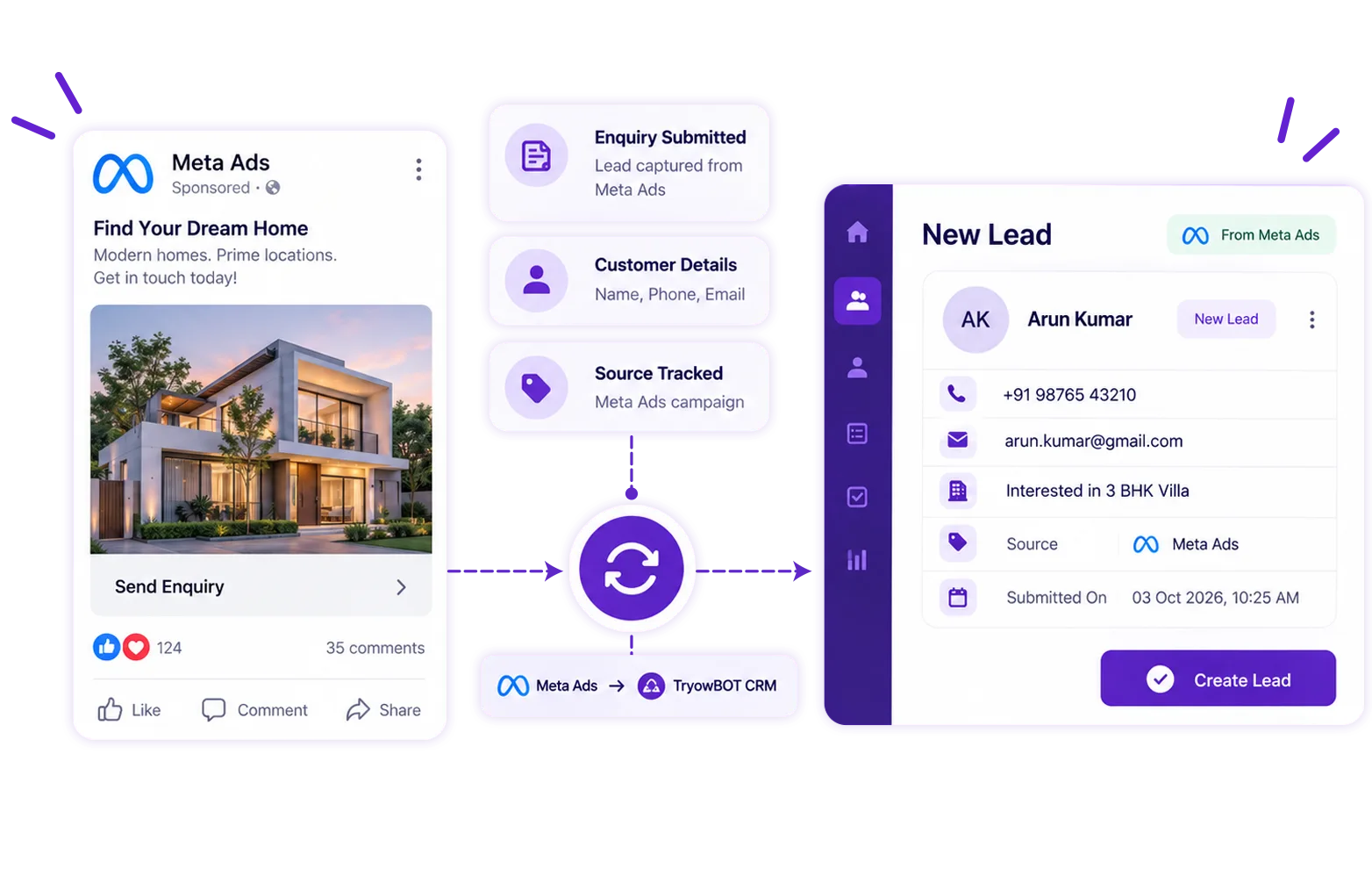
Meta Ads lead capture in TryowBOT CRM
Lead Capture

Every Meta Enquiry Gets a Place in Your CRM

Keep Meta-generated enquiries connected to customer records so your sales team has a clear starting point for every new opportunity.

Customer Details

Keep available contact information with the lead record.

Lead Source

Keep the source of the enquiry connected to the CRM record.

Lead Record

Give sales representatives one place to manage the enquiry.

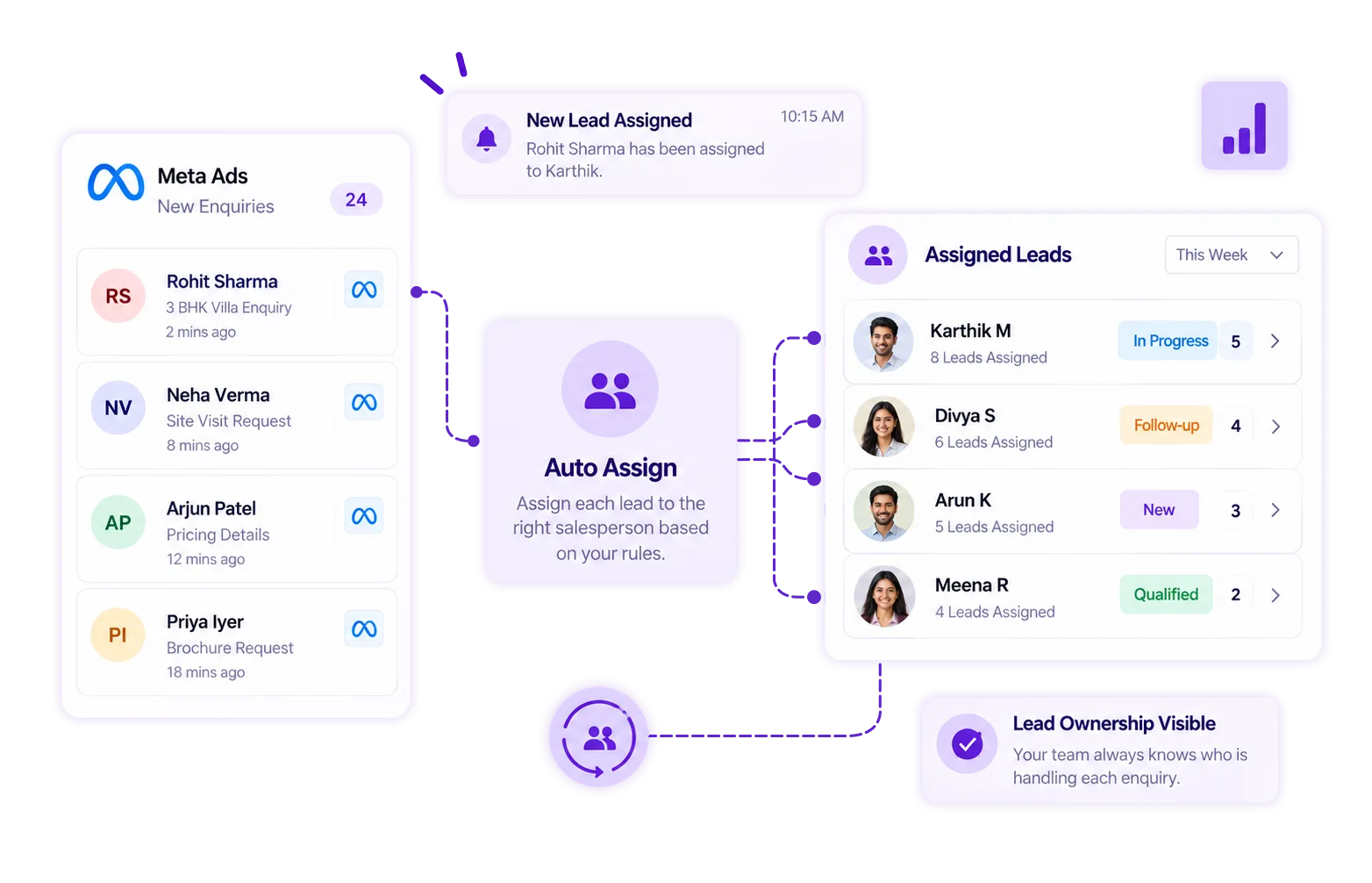
Meta Ads lead assignment in TryowBOT CRM
Lead Assignment

Every Lead Has a Sales Owner

New enquiries need someone responsible for the next conversation. TryowBOT CRM keeps lead ownership visible so your team knows which salesperson is handling each enquiry.

Know Who Handles the Lead

See the salesperson responsible for each enquiry.

Keep Ownership Visible

Make lead responsibility clear across your sales team.

Continue the Sales Record

Keep activities and follow-ups connected to the lead.

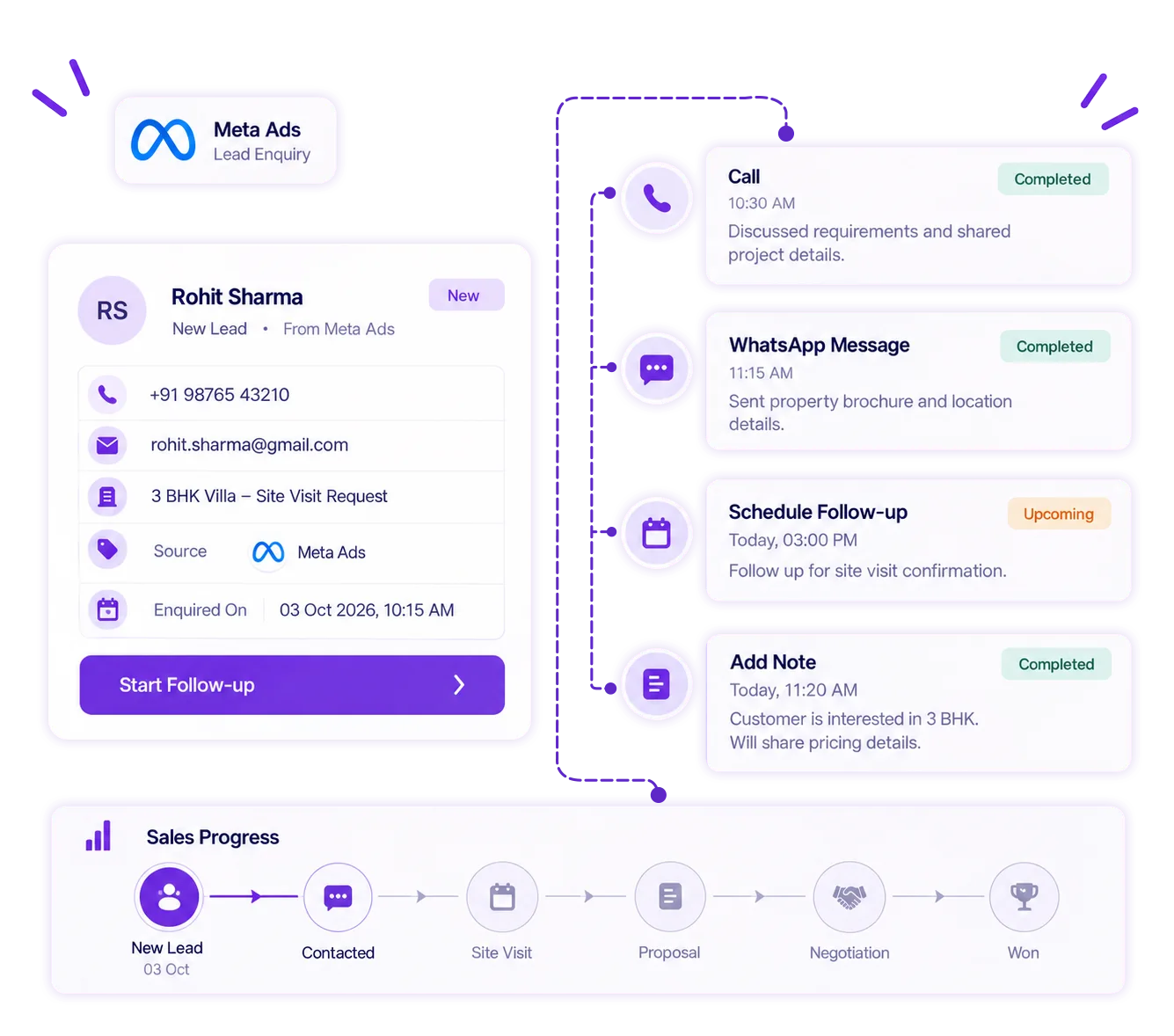
Meta Ads lead follow-up and sales activities in TryowBOT CRM
Lead Follow-Up

Keep Every Meta Lead Moving After the First Enquiry

Keep conversations, activities, tasks, and next follow-up actions connected to each Meta Ads lead so your sales team always knows what needs to happen next.

Follow-Up Activities

Keep calls, conversations, activities, and customer interactions connected to the lead record.

Next Action

Keep the next follow-up task visible so sales representatives know what to do next.

Sales Progress

Move the lead through your sales process as conversations continue toward conversion.

SALES PIPELINE

See Every Opportunity Move Through Your Sales Pipeline

Track each Meta lead as it moves from a new enquiry through customer conversations, qualification, active opportunities, and final sales outcomes.

01
New Lead

See newly captured Meta enquiries that are ready for sales action.

02
Contacted

Track leads where your sales team has started the customer conversation.

03
Qualified

Identify leads that have progressed beyond the initial enquiry and show sales potential.

04
Opportunity

Keep active sales opportunities visible as they move toward a purchase decision.

05
Won / Lost

Record the final sales outcome and keep the result connected to the CRM lead.

New Lead. Qualified Opportunity. Sales Outcome.

Keep every opportunity visible across your sales pipeline and track its progress inside TryowBOT CRM.

Send CRM Conversion Signals Back to Meta.

Connect your TryowBOT CRM conversion activity with Meta through Conversion API and send relevant conversion events directly from your CRM.

CRM DATA.
META SIGNALS.

Meta Conversion API with TryowBOT CRM

Connect CRM Conversions

Connect relevant conversion activity recorded in TryowBOT CRM with Meta through Conversion API.

Send Conversion Events

Send relevant CRM conversion events to Meta when supported conversion activity occurs.

Server-Side Data Sharing

Share conversion data from your CRM with Meta through a server-to-server Conversion API connection.

Keep Meta Updated

Keep relevant conversion signals flowing from your CRM back to Meta through CAPI.

Your CRM records the conversion. CAPI sends the signal.

Connect TryowBOT CRM with Meta Conversion API.

META ADS LEAD MANAGEMENT

Everything Your Team Needs After a Meta Lead Arrives

Capture Meta Ads leads in your CRM, assign them to your sales team, keep follow-ups on track, and connect sales conversions back to Meta with CAPI.

Meta Lead Capture

Bring Meta Ads enquiries into TryowBOT CRM and keep available lead information connected to the customer record.

Lead Assignment

Assign incoming Meta leads to the right salesperson and keep lead ownership clear across your team.

Lead Follow-Ups

Keep customer follow-ups, activities, tasks, and next actions connected to every Meta Ads lead.

Sales Pipeline

Track Meta Ads leads through your sales stages and see how each opportunity progresses toward conversion.

Lead Status Tracking

Keep every enquiry's current status visible so your sales team knows which leads need attention and follow-up.

Meta Conversion API

Send relevant CRM conversion events back to Meta through CAPI as leads progress through your sales journey.

Integrations

Get more value from your tools

Connect your tools, connect your teams. With over 200 apps already available in our directory, your team’s favourite tools are just a click away.

Your Next Customer Could Already Be in Your Next Lead.

Give every Meta enquiry a clear path from first contact to follow-up, sales opportunity, and customer conversion with TryowBOT CRM.

Book a Demo
Avatar-image Avatar-image Avatar-image Avatar-image
+8
10,000+ Businesses trust TryowBOT

Frequently Asked Questions