














TryowBOT WhatsApp Appointments

Turn WhatsApp Conversations Into Confirmed Appointments

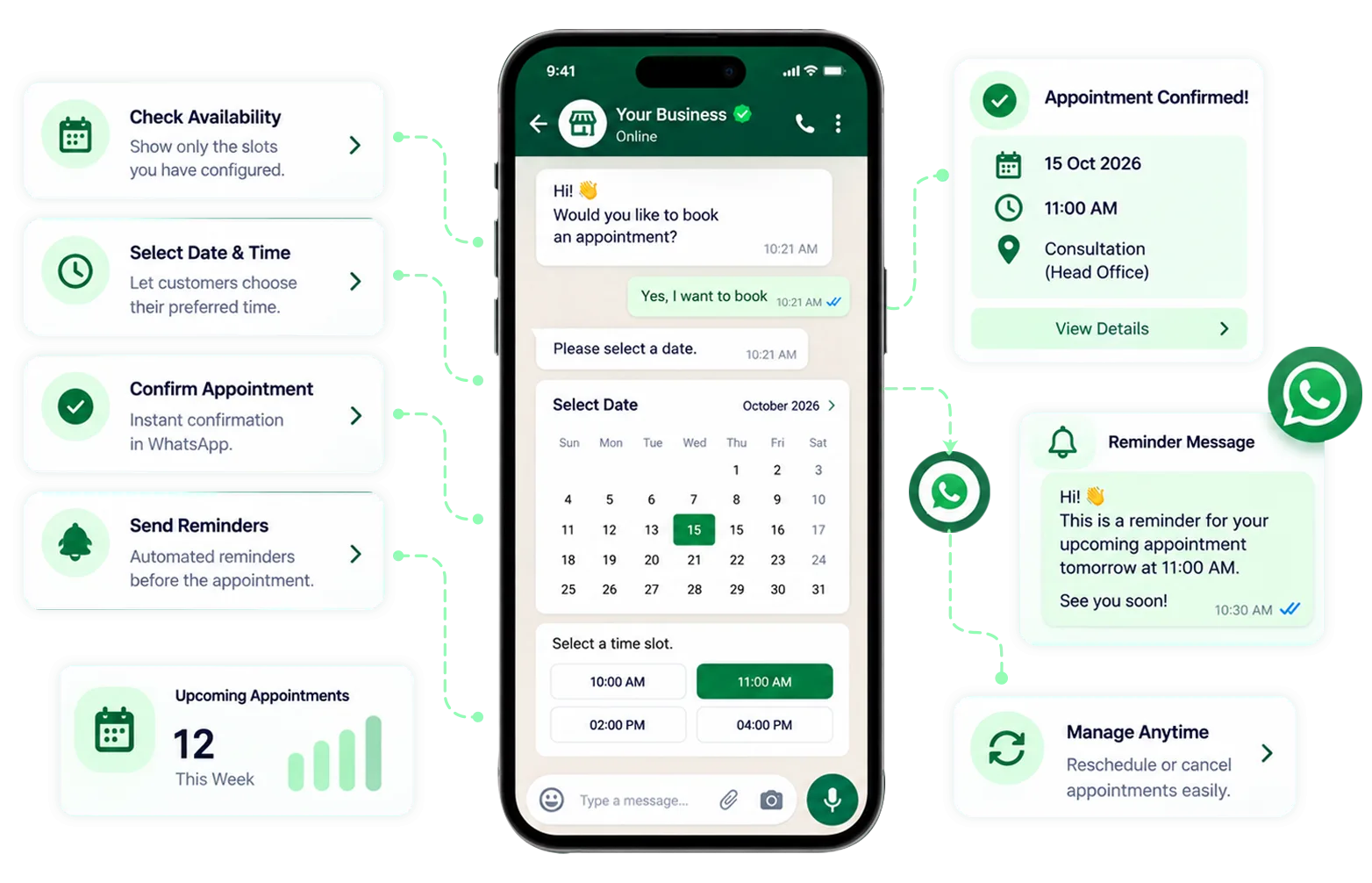
Let customers discover available slots, book appointments, reschedule, cancel, and receive reminders — all directly through WhatsApp.

With TryowBOT's WhatsApp Appointment Booking, businesses can automate the complete appointment journey without requiring customers to leave WhatsApp.

WhatsApp Shared Inbox for team customer communication

Trusted by Growing Businesses

Helping businesses connect with customers through WhatsApp.
A2C House of Kurtis women's ethnic wear
AARA Homemade Skincare products
Ampere Pro Engineering Technology Pvt Ltd
Avatar Financial Group financial services
Avira Organics natural health food products
CARE Dental Hospital dental care services
Cash Bazzar loan for multiple loan services
CrestLuxe Realty real estate services
Ekatrika Ventures laundry and dry cleaning services
Family Medicals pharmacy and healthcare
kottakkal farook arts and science college education
Maruthi School of banking training and education
Surgical Shop medical equipment and surgical supplies
Yamaha motorcycles and bikes
Royal Enfield motorcycles and bikes
Connect With Customers Through WhatsApp Voice Calls

WhatsApp Appointment Booking Made Simple

Let Customers Book Appointments Without Leaving WhatsApp

Turn your WhatsApp conversations into an automated appointment booking experience.

  • Start an appointment conversation
  • Select their preferred date
  • View available time slots
  • Confirm their appointment
  • Reschedule when needed
  • Cancel an appointment
  • Receive appointment reminders
  • Rebook after cancellation

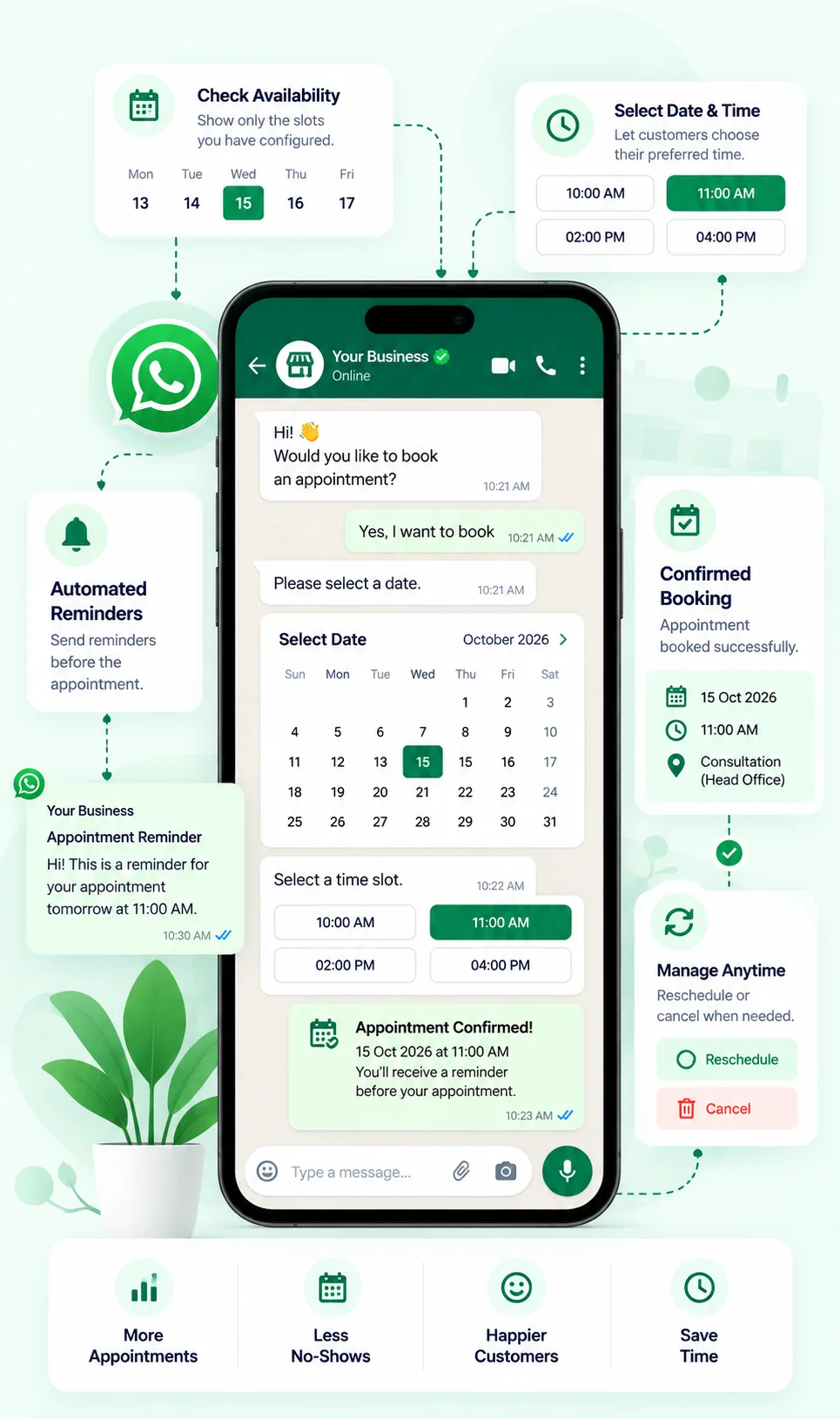
TryowBOT automatically checks your configured availability and shows customers only the slots they can actually book.

From the first WhatsApp message to the final appointment reminder, automate the entire booking journey in one place.

Connect Faster

Give customers a direct way to reach your business when a voice conversation is the fastest way to get help.

Better Customer Support

Help your team understand customer needs and provide personal support through direct conversations.

Resolve Issues Quickly

Move customer conversations forward faster by resolving questions and support requests through voice.
How It Works

How WhatsApp Appointment Booking Works

A Simple Booking Journey for Your Customers

1

Start on WhatsApp

Customers send your configured appointment trigger word to start the booking process.

2

Select a Date

Customers choose the date they want to book.

3

Choose an Available Slot

TryowBOT dynamically displays available time slots based on your configured business hours.

4

Confirm the Appointment

Customers confirm their preferred slot and instantly receive a booking confirmation.

Flexible Availability

Manage Your Appointment Availability

Configure exactly when customers can book appointments based on your business hours and availability.

Monday

Available
Morning 09:00 AM – 01:00 PM
Afternoon 02:00 PM – 06:00 PM

Tuesday

Available
Morning 09:00 AM – 01:00 PM
Afternoon 02:00 PM – 06:00 PM

Wednesday

Available
Morning 09:00 AM – 01:00 PM
Afternoon 02:00 PM – 06:00 PM

Thursday

Available
Morning 09:00 AM – 01:00 PM
Afternoon 02:00 PM – 06:00 PM

Friday

Available
Morning 09:00 AM – 01:00 PM
Afternoon 02:00 PM – 06:00 PM

Saturday

Limited
Available 09:00 AM – 02:00 PM

Sunday

Closed

No appointments available on Sunday.

Booking Controls

Customize Appointment Rules

Create booking rules that match your business capacity, appointment duration, and scheduling requirements.

Appointment Duration

Define how long each appointment slot will last.

15 min 30 min 60 min

Cancellation Window

Set the minimum time required before customers can cancel or reschedule.

Max Bookings Per Day

Limit the number of appointments that can be booked each day.

Advance Booking

Control how many days ahead customers can schedule appointments.

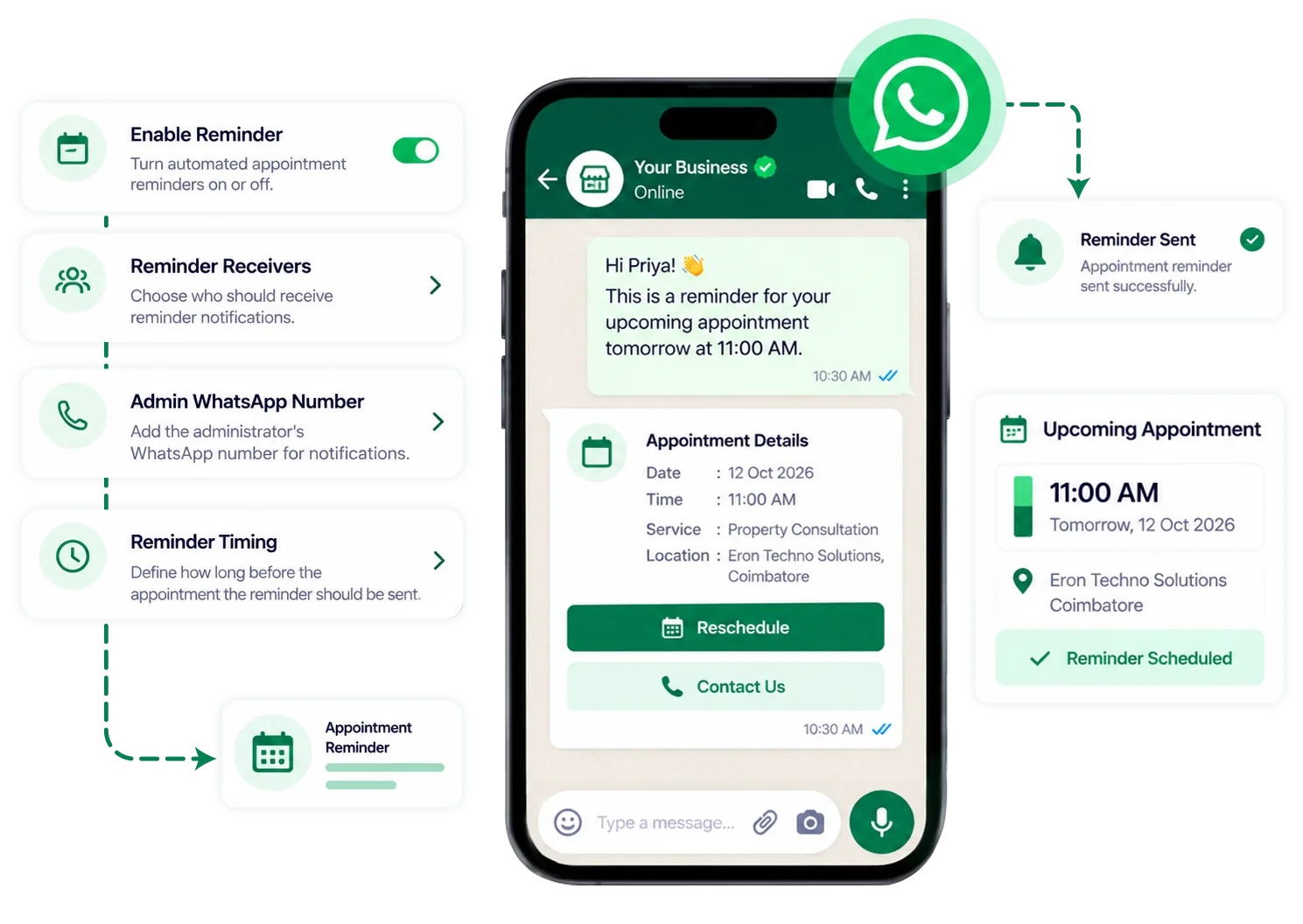
Automated Reminders

Reduce Missed Appointments With WhatsApp Reminders

Automatically remind customers before their appointment and keep your team informed without manual follow-ups.

Enable Reminder

Turn automated appointment reminders on or off.

Reminder Receivers

Choose who should receive reminder notifications.

Admin WhatsApp Number

Add the administrator's WhatsApp number for notifications.

Reminder Timing

Define how long before the appointment the reminder should be sent.

Manage Real Estate Property Enquiries on WhatsApp
Appointment Management

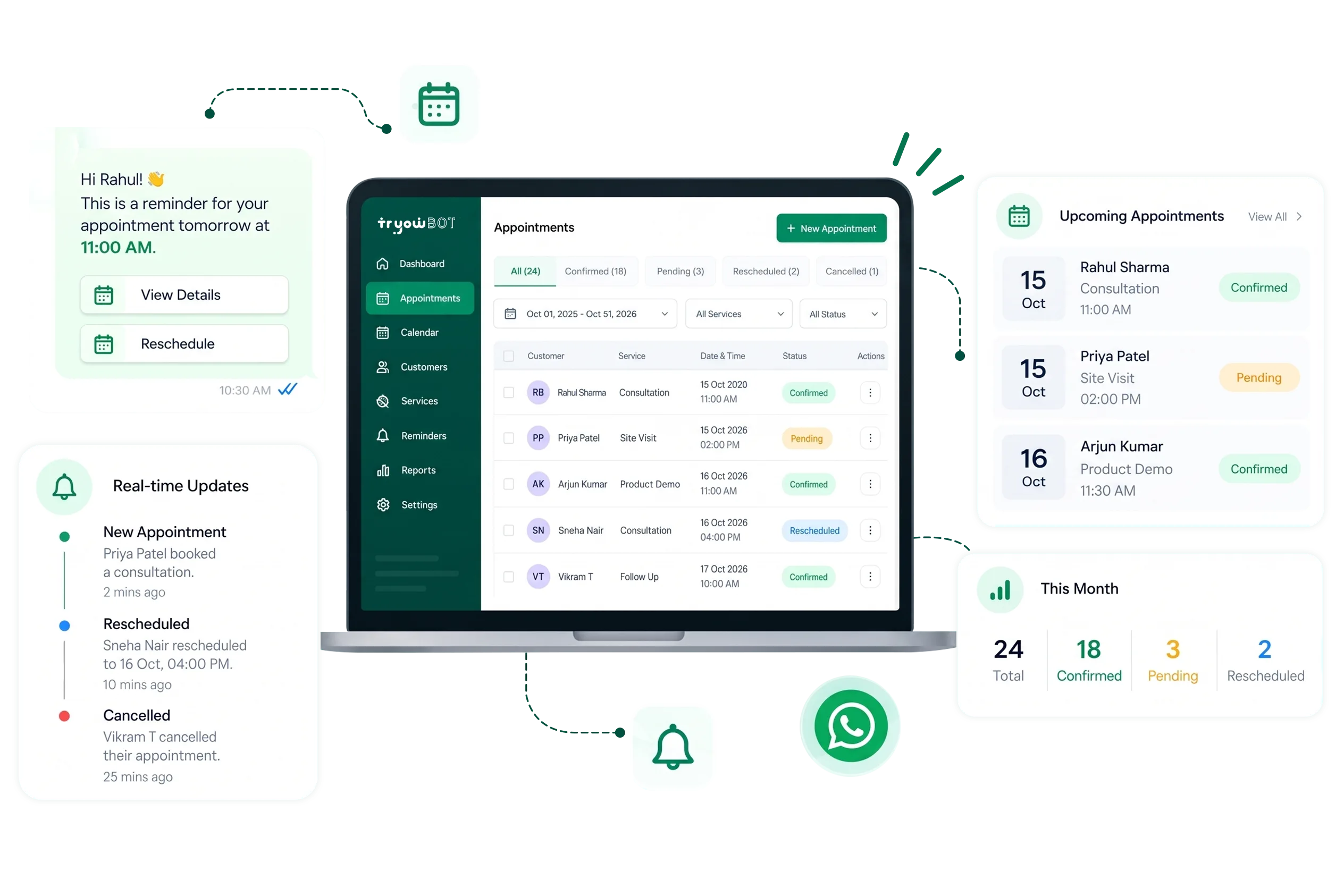
Manage Every Appointment From One Place

Keep track of your complete appointment lifecycle with organized booking views and easy data export.

Dashboard Lexend
Appointment Trigger

Start Booking With a Simple WhatsApp Message

Configure a trigger word that automatically starts your appointment booking journey when customers send it.

BOOK APPOINTMENT APPOINTMENT BOOK NOW

WhatsApp

Customer conversation
BOOK APPOINTMENT
Appointment flow started
WhatsApp Templates

Create a Consistent Appointment Experience

Configure dedicated WhatsApp templates for every stage of the appointment booking journey.

Welcome Template

Active

Welcome! 👋 Ready to schedule your appointment?

Fixed Button

Slot Selection Template

Dynamic

Available time slots are generated dynamically after the customer selects a date.

Dynamic Button

Booking Confirmation

Appointment Confirmed

Your appointment is confirmed for 30 September at 10:00 AM.

Confirmed

Reminder Message

Reminder: Your appointment is scheduled for tomorrow at 10:00 AM.

Cancellation Message

Your appointment has been cancelled successfully.

Reschedule Message

Choose a new date and available time slot for your appointment.

Flexible Booking

Easy Rescheduling & Cancellation

Give customers control over their appointments while keeping your scheduling rules in place.

Reschedule

Customers can select another available date and time directly from WhatsApp.

Cancel

Allow customers to cancel appointments according to your configured rules.

Rebook

Let customers quickly start a new booking after cancelling an appointment.

Reminder Template

Send Timely WhatsApp Appointment Reminders

Keep customers informed with automated reminders before their scheduled appointments.

Appointment date and time
Rescheduling option
Cancellation option

Appointment Reminder

WhatsApp Template

Hi! This is a reminder for your upcoming appointment scheduled on 30 September at 10:00 AM.

Cancellation

Keep Customers Informed After Cancellation

Automatically confirm cancelled appointments and provide a quick path to rebook.

Appointment Cancelled

WhatsApp notification

Your appointment scheduled for 30 September at 10:00 AM has been cancelled successfully.

Rescheduling

Make Appointment Changes Effortless

Let customers choose a new date and time without requiring manual intervention from your team.

1

Reschedule

2

Select Date

3

View Slots

Confirm

Complete Automation

Automate Your Entire Appointment Lifecycle

From the first WhatsApp message to completed appointments, automate every important step.

01

Trigger

02

Welcome

03

Date

04

Slots

05

Confirm

Complete

Benefits

Why Use WhatsApp for Appointment Booking?

Make appointment scheduling easier for customers while reducing repetitive work for your team.

24/7 Appointment Booking

Let customers request and manage appointments whenever they need them.

Automated Slot Availability

Show available appointment times based on your configured schedule.

Automated Reminders

Send timely WhatsApp reminders before scheduled appointments.

Better Customer Experience

Keep the entire appointment journey inside WhatsApp.

Easy Rescheduling

Let customers change their appointment without manual coordination.

Centralized Management

Manage all, upcoming, and completed appointments from one dashboard.

Built for Appointment-Based Businesses

WhatsApp Appointment Booking for Every Industry

Automate scheduling and customer communication across different appointment-based businesses.

Healthcare

Schedule patient consultations and send appointment reminders.

Salons & Beauty

Let customers schedule services at their preferred time.

Real Estate

Schedule property visits and customer consultations.

Automotive

Schedule service appointments, inspections, and test drives.

Consultants

Let prospects book consultation sessions directly through WhatsApp.

Fitness & Wellness

Manage trainer sessions, consultations, and classes.

Education

Schedule admissions consultations and counseling sessions.

Professional Services

Manage meetings, consultations, and customer appointments.

Powerful Features

Everything You Need to Manage Appointments

Build a complete WhatsApp appointment booking experience with flexible scheduling and automation controls.

Appointment Booking

Book appointments directly through WhatsApp.

Availability Management

Configure working days and appointment hours.

Dynamic Slots

Generate available slots based on your schedule.

Appointment Duration

Define the duration of each appointment.

Cancellation Rules

Define when customers can cancel appointments.

WhatsApp Reminders

Automatically remind customers before appointments.

Trigger Words

Start booking with configurable keywords.

Rescheduling

Let customers change their appointment.

Data Export

Export appointment records for reporting.

WhatsApp Experience

Built for Automated Customer Conversations

Give customers a simple appointment experience without making them leave WhatsApp.

Customer

WhatsApp conversation
BOOK APPOINTMENT
Choose your preferred date.
30 September
Available slots

TryowBOT

Automated appointment flow
Checks availability
Generates available slots
Confirms the appointment
Sends appointment reminders
Handles rescheduling and cancellation
Integrations

Get more value from your tools

Connect your tools, connect your teams. With over 200 apps already available in our directory, your team’s favourite tools are just a click away.

Turn WhatsApp Into Your Appointment Booking Assistant

Give your customers a faster way to schedule appointments while reducing manual booking work for your team.

Book a Demo
+8
10,000+ Businesses trust TryowBOT

Frequently Asked Questions