Your customers are already talking to your business on WhatsApp. Don't make your sales team manually copy those conversations into another CRM.
Your team shouldn't have to manually process every customer interaction. Connect relevant WhatsApp activities with CRM Automation and create workflows around what customers do.
For example, when a customer completes a specific WhatsApp Flow, your configured CRM workflow can use that event to initiate the next stage of your lead management process.
Let configured workflows handle repetitive CRM processing instead of requiring your team to perform every action manually.
Customer actions can become the starting point for the next stage of your CRM workflow.
Create a consistent process that your sales team can follow as customer volume grows.
WhatsApp has become an important customer communication channel. But when conversations, customer details and follow-ups remain inside separate chats, your sales process becomes difficult to manage.
TryowBOT connects the customer conversation with the CRM workflow so your team can move from enquiry to opportunity without unnecessary manual steps.
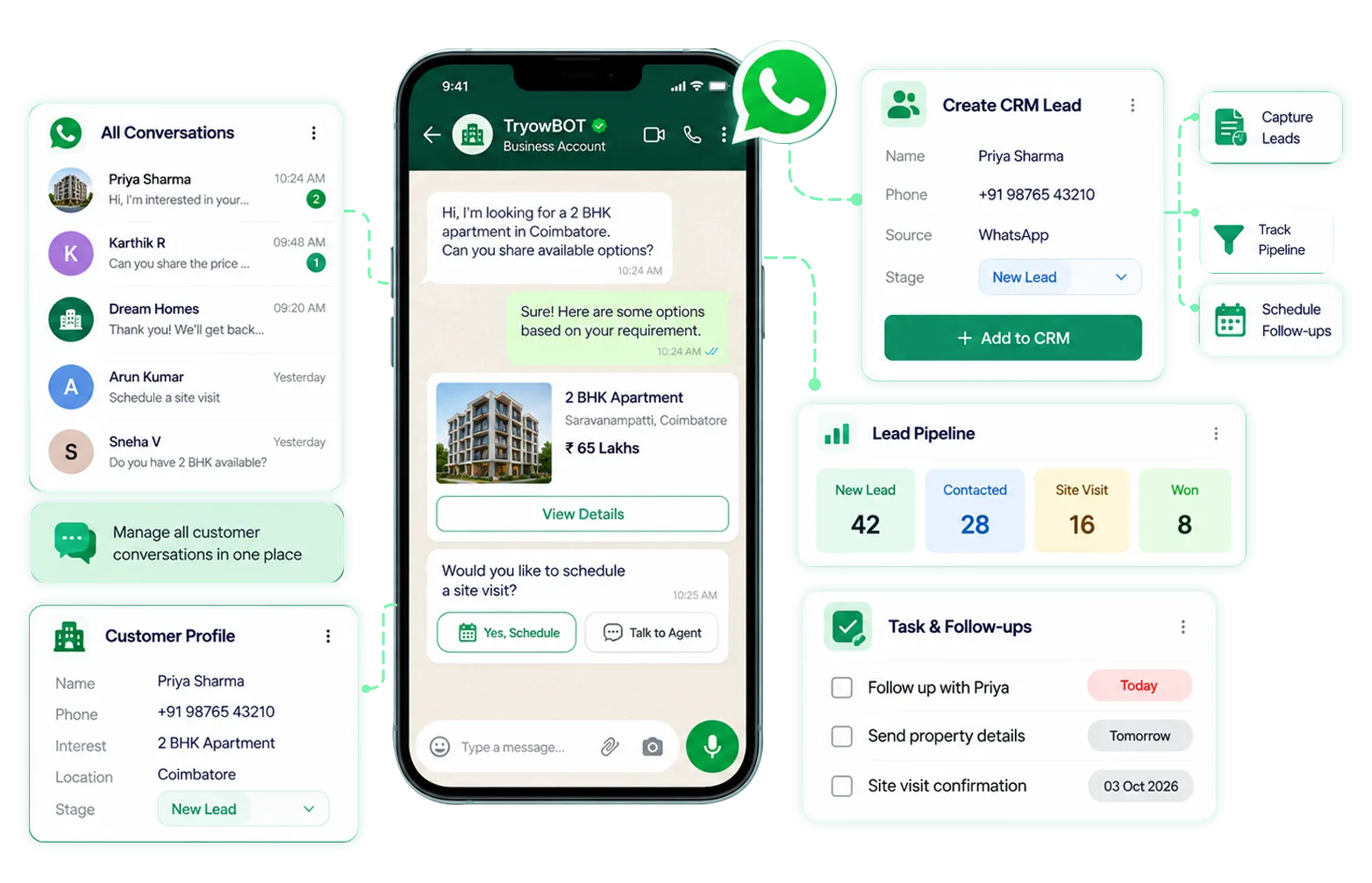
Your sales team can identify a genuine opportunity while talking with a customer. Instead of opening another CRM window and entering the information manually, TryowBOT provides a direct way to convert the conversation into a CRM lead from the chat area.
This keeps the transition from customer conversation to CRM management simple and helps your team preserve the context of the opportunity they have already started discussing.
The customer discusses their requirement through WhatsApp.
The salesperson recognizes that the conversation represents a potential business opportunity.
The agent uses the lead conversion action available directly in the chat area.
The opportunity becomes part of the CRM workflow for assignment, activities and follow-up.
Hi, I am interested in your service. Can you tell me more about the pricing?
Sure. I can help you with that. Let me understand your requirements first.
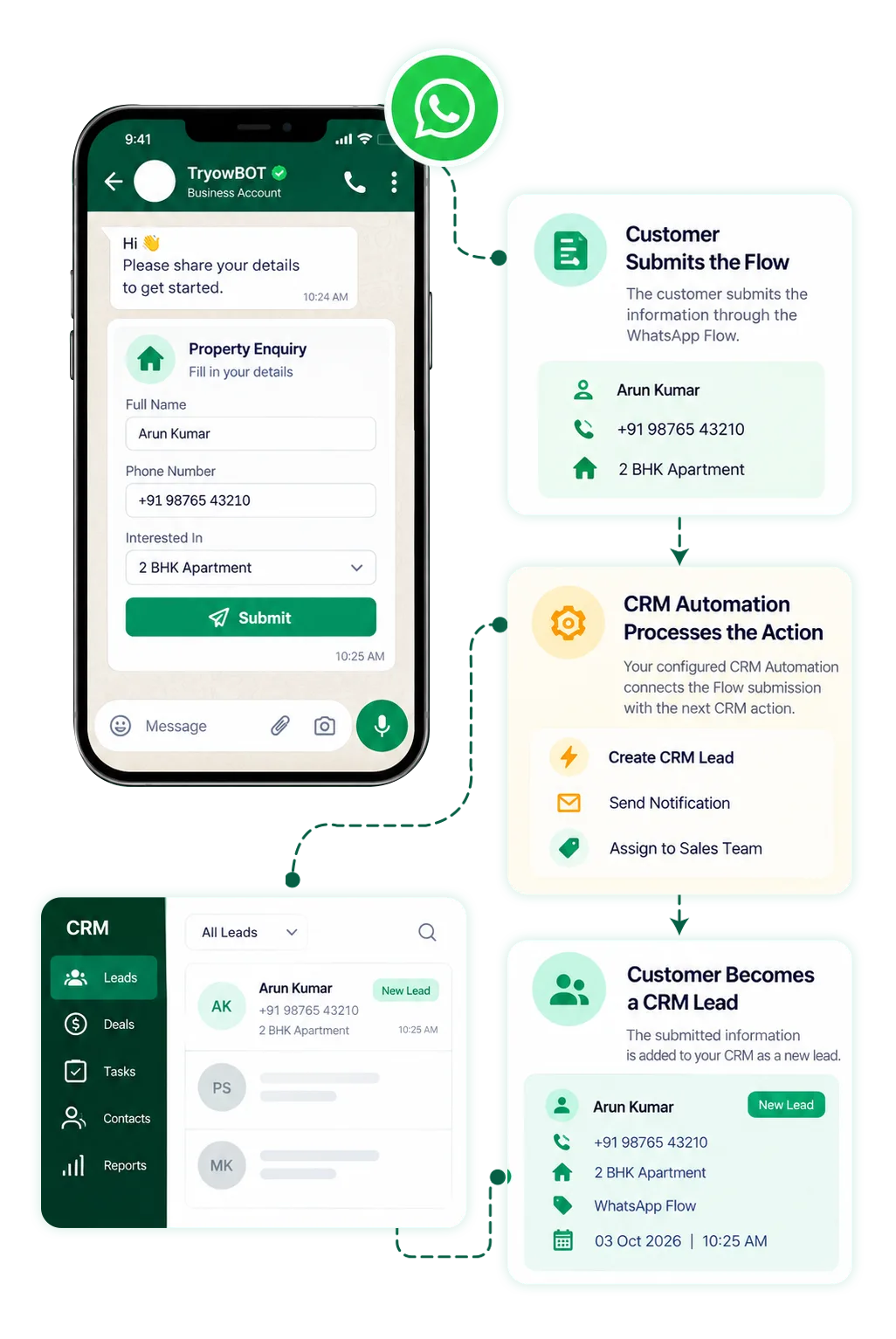
When your business needs structured information from customers, use a WhatsApp Flow to collect the required details. Connect that submitted information with your CRM workflow instead of leaving it isolated inside the conversation.
The customer submits the information through the WhatsApp Flow designed for your business.
Your configured CRM Automation can connect the Flow submission with the next CRM action.
The submitted customer information can be brought into the CRM lead workflow for your sales team.
Salespeople can continue with qualification, assignment, activities and follow-up.
Already using a CRM? You don't have to replace it. Create your WhatsApp Flow, collect the customer information you need, and use the POST Data URL in TryowBOT WhatsApp Automation to send submitted data directly to your existing CRM or business system.
Build a WhatsApp Flow to collect structured information directly from your customers. Ask for details such as name, phone number, enquiry type, location, product requirement or any other information your business needs.
Connect the WhatsApp Flow with your existing application using the POST Data URL. When the customer submits the Flow, TryowBOT can send the collected information to the endpoint you configure for your CRM or business application.
Your business does not need to migrate to a new CRM just because you want WhatsApp automation. Receive the submitted Flow data in your existing CRM and continue using your current sales, support or business management workflow.
Ask customers to submit their requirements through a WhatsApp Flow. Once the form is completed, pass the submitted information to your CRM endpoint and create a new lead using your existing lead-management process.
Collect specific information in your Flow and use your existing CRM logic to process the submitted data. This can help your business route enquiries based on the customer's requirement, service type, location or other information captured through WhatsApp.
WhatsApp can become the starting point of your existing sales process. Capture customer information in the conversation, submit it through the Flow and let your CRM take over the next stage of lead management.
If your business already has a CRM, ERP, lead-management application or custom backend that accepts API requests, the POST Data URL provides a way to connect your WhatsApp Flow submission with that existing system.
Creating a lead is only the beginning. TryowBOT gives your sales team a structured way to continue working with the customer after the initial WhatsApp interaction.
Organize customers who have shown interest and bring their information into a structured lead workflow.
Give your sales team a clear view of what needs to happen next after a customer becomes a lead.
When an opportunity is qualified, move it forward into deal management and continue tracking the sales journey.
The goal isn't simply to manage more conversations. It's to give your team the structure, context and workflow needed to turn those conversations into business opportunities.
Turn relevant WhatsApp conversations into CRM leads from the chat workflow instead of manually rebuilding the enquiry.
Use WhatsApp Flows to collect the information your business needs before moving the customer into the CRM process.
Connect customer actions with CRM Automation to reduce repetitive work for your sales and operations teams.
Give your team a structured way to organize lead ownership and ensure opportunities reach the right people.
Turn customer opportunities into structured activities so important conversations have a clear next action.
Continue managing the customer through leads, activities, opportunities and deals instead of stopping at the chat.
When customer conversations are distributed across different team members, managers can struggle to understand what is happening with each opportunity.
The value isn't another dashboard. It's having a more organized process around every customer opportunity entering through WhatsApp.
A connected workflow reduces the gap between the customer conversation and the business process that follows it.
| Traditional WhatsApp Workflow | With TryowBOT WhatsApp CRM |
|---|---|
|
Leads remain inside individual conversations.
|
Relevant conversations can be converted into CRM leads.
|
|
Customer information may need to be copied manually.
|
WhatsApp Flow data can be connected with CRM workflows.
|
|
Follow-ups depend heavily on individual memory.
|
CRM activities help organize the next customer action.
|
|
WhatsApp and CRM operate as separate workflows.
|
Conversations and CRM activities work within one connected process.
|
|
Customer journey becomes difficult to track.
|
Leads, activities and deals can be managed through CRM.
|
|
Management has limited visibility into sales activity.
|
CRM reporting provides visibility into customer and sales activity.
|
TryowBOT connects WhatsApp communication with CRM management so your team can turn customer interactions into structured business opportunities.
TryowBOT doesn't treat WhatsApp and CRM as two separate systems. It connects customer conversations, WhatsApp Flows, lead creation, CRM Automation and sales activities into one connected workflow.
Your customer can start with a WhatsApp message, submit a WhatsApp Flow, become a CRM lead and continue through your sales process without forcing your team to manage each stage in a disconnected system.
When an agent identifies a genuine opportunity inside a WhatsApp conversation, the chat can be converted into a CRM lead directly from the chat area.
Customer information collected through WhatsApp Flows can be connected with your CRM workflow instead of remaining isolated inside the form.
Connect customer actions with CRM actions and build workflows that reduce repetitive manual processing for your sales team.
Continue managing customers after the first WhatsApp interaction through leads, follow-ups, deals and customer relationship activities.
Move relevant WhatsApp conversations into your CRM without rebuilding the customer information manually.
Use WhatsApp Flows to collect customer information in a structured format.
Build workflows around customer actions and CRM events.
Assign leads and organize customer responsibilities across your sales team.
Keep customer activities and next actions organized inside your CRM workflow.
Gain visibility into leads, opportunities, activities and customer journeys.
Connect your tools, connect your teams. With over 200 apps already available in our directory, your team’s favourite tools are just a click away.
Connect WhatsApp conversations, WhatsApp Flows, CRM Automation, leads, follow-ups and deals in one connected customer journey with TryowBOT.
Book a DemoDon't let valuable customer conversations disappear inside chat history. Give every enquiry a structured path from conversation to CRM lead, follow-up and deal.
Yes. TryowBOT provides a Convert as Lead option directly inside the WhatsApp chat area. When a customer shows genuine interest, your team can convert the conversation into a CRM lead without manually copying the customer's details into another system.
Yes. TryowBOT can connect WhatsApp Flow forms with CRM. When customers submit information through a business-designed WhatsApp Flow, the collected data can be captured and managed as CRM lead information instead of remaining only inside the WhatsApp conversation.
Yes. TryowBOT CRM Automation can be connected with WhatsApp Flow submissions. Once a customer completes a configured form, the submitted information can be passed into the CRM workflow and used to create or process the lead according to your configured automation.
Yes. Leads collected from WhatsApp can be managed through the CRM so your sales team can organize customer information, track lead progress, assign ownership and continue the sales process without depending entirely on the original chat.
Yes. TryowBOT provides translation controls inside the admin-panel chat area. When a customer sends a message in another language, your team can use the available manual translation buttons to understand the incoming message in a preferred language and continue the conversation.
Yes. TryowBOT brings WhatsApp communication and CRM workflows together. Your team can communicate with customers through WhatsApp while also moving relevant conversations into lead management, follow-ups and sales workflows.
Yes. CRM Automation can use information collected through connected WhatsApp workflows to trigger configured CRM actions. This can help businesses reduce manual data entry and create a more consistent process from customer interaction to lead management.
Yes. TryowBOT CRM is designed to help teams manage leads rather than keeping customer information with one individual salesperson. Leads can be organized within the CRM so the appropriate team members can work on customer enquiries and follow the sales process.
Yes. Once a WhatsApp enquiry becomes a CRM lead, your sales team can continue managing the opportunity through the CRM workflow. This makes it easier to move from an initial conversation to structured follow-up instead of relying only on chat history.
WhatsApp is excellent for customer conversations, but a CRM gives your business a structured way to manage what happens after the conversation. TryowBOT connects both workflows so enquiries can move from WhatsApp conversations and forms into organized lead management, automation and follow-up processes.