Introduction
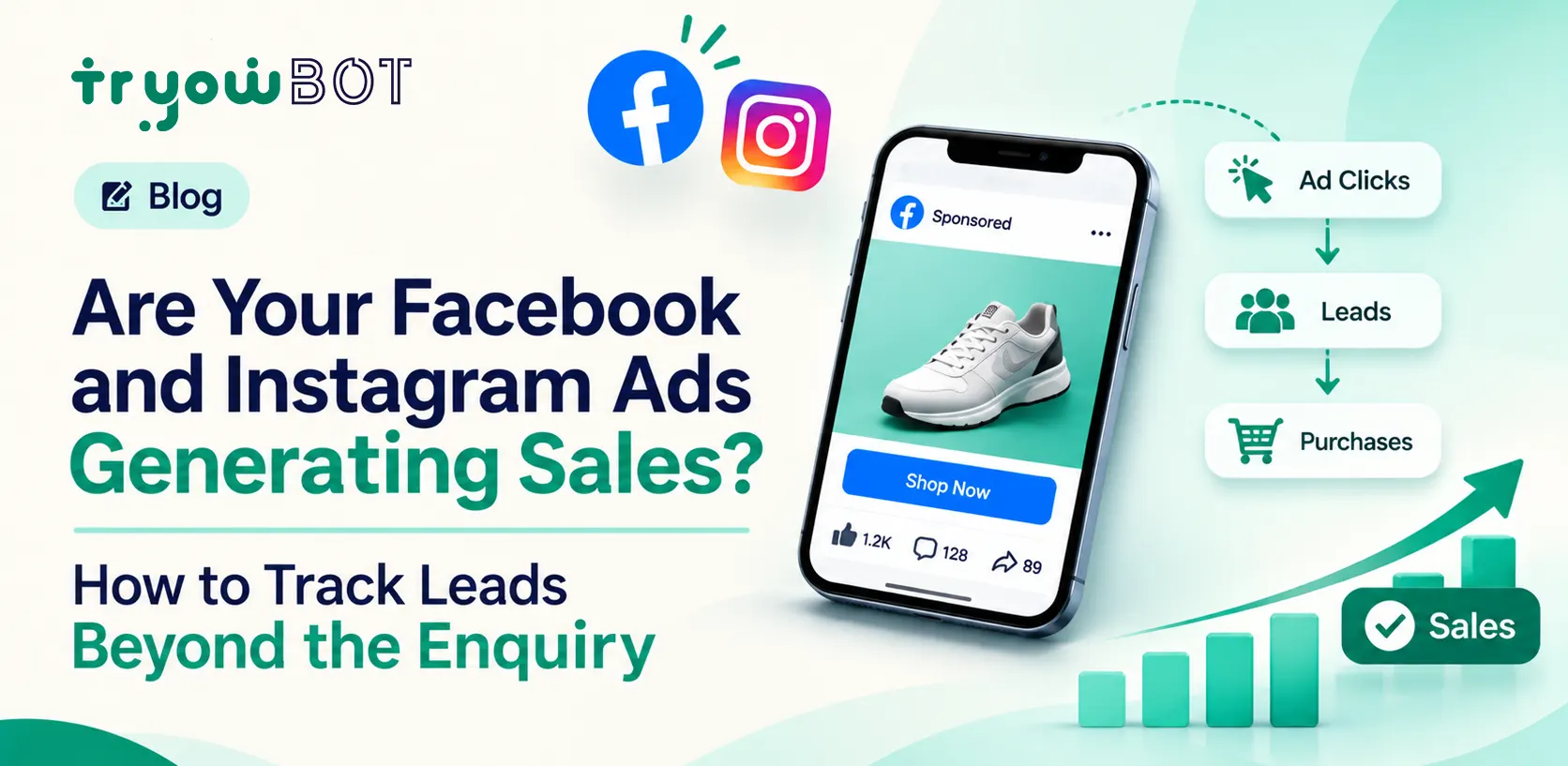
Your Facebook and Instagram advertisements are generating enquiries. Your notification count is increasing, and your advertising dashboard shows new leads every day.
But there is one important question:
How many of those enquiries are actually becoming paying customers?
For many businesses, this is where the real challenge begins.
A person submits a Facebook lead form, requests information through Instagram or clicks an advertisement to contact your business. The enquiry reaches your team, but what happens next?
Was the customer contacted? Did they show genuine interest? Were they qualified? Did they request a quotation? Did they eventually make a purchase?
If you only measure the number of enquiries generated by your advertisements, you may never understand the complete value of your advertising investment.
This is why businesses need to track leads beyond the initial enquiry.
By connecting Facebook and Instagram Ads with CRM software, companies can capture customer enquiries, manage sales follow-ups, monitor lead progress and record successful deals. With an appropriate Meta Conversions API integration, relevant conversion information can also be sent back to Meta.
In this guide, we will explain how to track Facebook and Instagram advertising leads from the first enquiry to the final sale, why CRM integration matters and how businesses can make better advertising decisions using actual sales information.
Why Tracking Enquiries Alone Is Not Enough
Many businesses evaluate their Facebook and Instagram advertising campaigns using three common metrics:
- Number of leads generated.
- Cost per lead.
- Number of clicks or impressions.
These metrics help measure advertising activity, but they do not necessarily indicate business success.
Consider this example.
A real estate company runs Facebook and Instagram lead generation campaigns with a monthly advertising budget of ₹30,000.
During the month, it receives 150 enquiries.
At first glance, the campaign appears successful. However, after the sales team reviews the enquiries, the actual results look different.
| Sales Metric | Result |
| Advertising spend | ₹30,000 |
| Total enquiries | 150 |
| Leads successfully contacted | 110 |
| Qualified leads | 35 |
| Property visits scheduled | 15 |
| Deals closed | 3 |
| Cost per lead | ₹200 |
| Cost per customer acquired | ₹10,000 |
The campaign generated 150 enquiries, but only three became customers.
If the company evaluates performance using only the cost per lead, it may believe the campaign is performing well without understanding the quality of its enquiries.
This is why businesses should measure the entire sales journey.
A useful advertising report should help answer:
- How many enquiries did the campaign generate?
- How many leads did the sales team successfully contact?
- How many enquiries became qualified opportunities?
- How many prospects progressed to a deal?
- How many customers actually purchased?
- How much did the business spend to acquire each customer?
These questions help connect marketing activity with actual business results.
What Is Facebook and Instagram Ads Lead Tracking?
Facebook and Instagram Ads lead tracking is the process of monitoring what happens after someone responds to your advertisement.
It goes beyond recording a form submission or message.
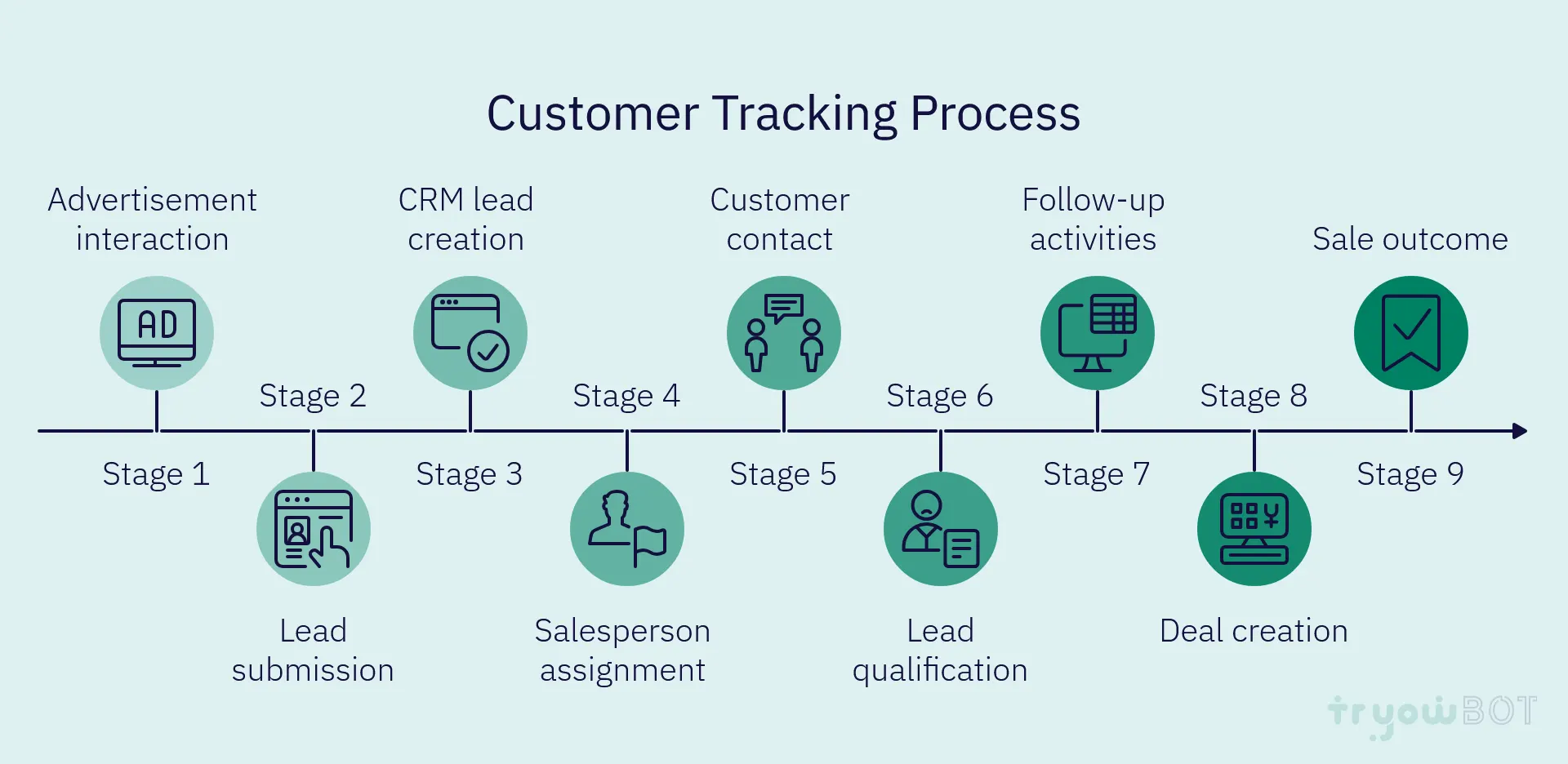
A complete tracking process follows the customer through different stages:
- Advertisement interaction.
- Lead submission.
- CRM lead creation.
- Salesperson assignment.
- Customer contact.
- Lead qualification.
- Follow-up activities.
- Deal creation.
- Successful or unsuccessful sale.
For example, a customer may submit a lead form for a software product.
The CRM stores the customer's information and identifies the enquiry source. A salesperson contacts the prospect, understands the requirement and schedules a product demonstration.
After the demonstration, the customer requests a quotation. The sales team follows up and eventually closes the deal.
Each of these activities provides useful information about the effectiveness of the advertising campaign and sales process.
Without a connected tracking system, businesses may have to collect this information from spreadsheets, advertising dashboards, emails and individual sales representatives.
A CRM brings the sales journey together in one place.
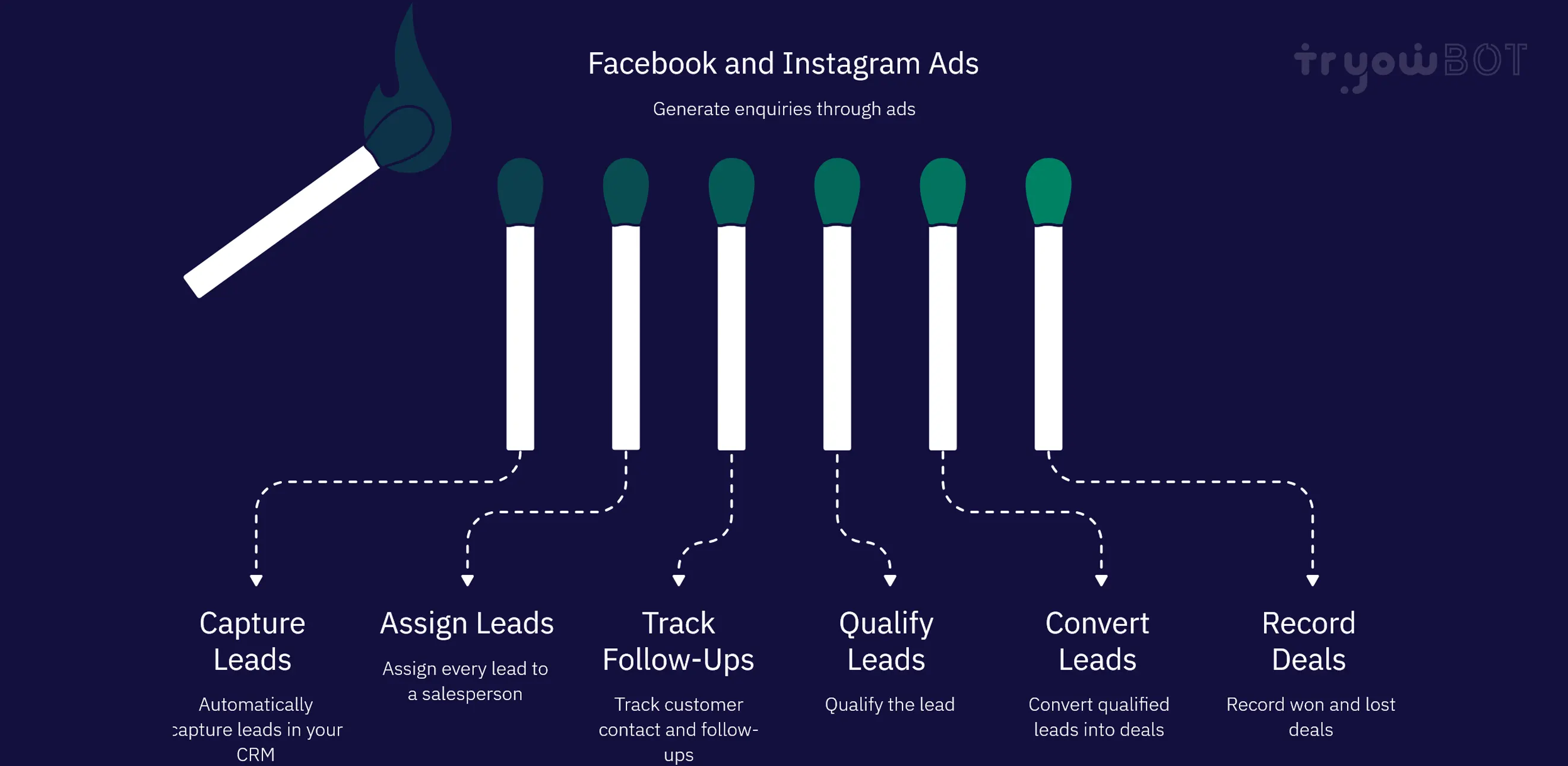
How to Track Facebook and Instagram Leads from Enquiry to Sale
Let's understand the complete process using a practical example.
Imagine an education company advertising its courses on Facebook and Instagram.
A prospective student sees an advertisement, submits an enquiry form and requests more information.
Here is how the business can track that enquiry.
Step 1: Generate Enquiries Through Facebook and Instagram Ads
The first step is to run lead generation campaigns.
Businesses can use different advertising formats to collect enquiries, including:
Facebook Lead Ads: Potential customers submit their details through an instant form or a website form.
Instagram Lead Ads: People discover the advertisement on Instagram and submit their enquiry through the available lead form experience.
Website Conversion Ads: People click an advertisement, visit the business website and complete an enquiry form.
Click-to-Message Ads: People start a conversation through a supported messaging destination.
Each channel creates an opportunity to capture a potential customer.
For lead form campaigns, businesses should make sure that the form collects the information needed for the sales process without asking unnecessary questions.
Useful fields may include:
- Name.
- Mobile number.
- Email address.
- Product or service requirement.
- Location.
- Preferred contact time.
The information collected should match your business requirements and privacy obligations.
Step 2: Automatically Capture Leads in Your CRM
After a customer submits a Meta lead form, the enquiry needs to reach your sales team quickly.
Without CRM integration, businesses may depend on manually downloading leads and uploading them into spreadsheets or another system.
This creates unnecessary work and increases the possibility of delayed follow-ups.
With a properly configured Meta lead integration, incoming enquiries can be transferred into your CRM.
The CRM can maintain available customer details and lead source information in a central lead record.
For example:
| CRM Field | Example Information |
| Customer Name | Arun Kumar |
| Mobile Number | Customer's submitted number |
| Customer's submitted email | |
| Lead Source | Facebook Ads |
| Requirement | Software Development Course |
| Lead Status | New |
| Assigned Salesperson | Sales Representative 01 |
This gives the sales team a clear starting point for every new enquiry.
Important: Lead retrieval and conversion tracking are two different processes. Retrieving leads brings enquiries into your CRM. Sending conversion events through Meta Conversions API communicates relevant downstream actions back to Meta.
Step 3: Assign Every Lead to a Salesperson
Capturing enquiries is not enough. Someone needs to take responsibility for contacting each customer.
Imagine your business receives 50 enquiries in one day.
If all 50 leads remain in a common list without clear ownership, some customers may receive delayed responses while others may not be contacted at all.
A CRM helps assign incoming enquiries to the appropriate sales representatives.
Businesses can organise lead assignment based on:
- Sales team or department.
- Lead source.
- Customer location.
- Product or service requirement.
- Individual salesperson.
- Round-robin distribution, where supported.
Clear ownership helps managers identify who is responsible for each enquiry.
It also makes it easier to review pending assignments and ensure that incoming leads receive attention.
Step 4: Track Customer Contact and Follow-Ups
The first conversation with a prospect is only the beginning.
Some customers may answer immediately, while others may request a callback or need additional information before making a decision.
Your sales team should record important activities, including:
- First contact attempt.
- Customer response.
- Call discussion.
- Product information shared.
- Meeting scheduled.
- Quotation sent.
- Next follow-up date.
For example, a customer enquiring about a commercial property may need information about location, pricing, amenities and availability.
The salesperson can record these interactions and schedule the next follow-up.
Keeping activities connected to the CRM lead record helps prevent important conversations from being lost.
Step 5: Qualify the Lead
Not every enquiry represents a genuine sales opportunity.
A customer may submit a form simply to compare prices, understand available options or collect general information.
The sales team needs to evaluate whether the prospect is a suitable customer.
Useful qualification factors include:
- Customer requirement.
- Budget.
- Purchase timeline.
- Decision-making authority.
- Product or service suitability.
- Level of interest.
Based on the conversation, the salesperson can update the lead status.
For example:
| Lead Status | Meaning |
| New | Enquiry has been received |
| Contacted | Salesperson has started the conversation |
| Uncontacted | No successful contact has been recorded |
| Qualified | Customer meets the business's qualification criteria |
| Follow-up Pending | Further communication is required |
| Converted | Lead has progressed into a sales opportunity |
Actual status names will depend on the CRM configuration and the company's sales process.
The important thing is to maintain consistent status updates.
Step 6: Convert Qualified Leads into Deals
Once a prospect becomes a genuine sales opportunity, the business should track it separately from general enquiries.
For example, a customer interested in purchasing an annual software subscription may request a quotation and discuss implementation.
The sales team can convert the qualified lead into a deal and manage the opportunity through the sales pipeline.
Important deal information may include:
- Deal name.
- Customer information.
- Expected value.
- Responsible salesperson.
- Deal stage.
- Notes and activities.
- Final outcome.
This helps managers understand how many advertising enquiries are progressing into actual sales opportunities.
Step 7: Record Won and Lost Deals
The final step is to record the sales outcome.
A deal may be:
Won: The customer purchases the product or service.
Lost: The customer decides not to proceed, selects another provider or no longer has the requirement.
Recording both outcomes is important.
For example, if a large number of leads are lost because customers find the pricing unsuitable, the business may need to review its targeting, messaging, pricing or qualification process.
If customers are interested but deals are lost because follow-ups are delayed, the sales team may need a better activity management process.
The goal is not simply to count enquiries. It is to understand why opportunities succeed or fail.
What Is Meta Conversions API and Why Does It Matter for Lead Tracking?
Meta Conversions API (CAPI) is a technology that allows businesses to send relevant conversion events from their servers or connected systems directly to Meta.
When businesses run Facebook and Instagram lead generation campaigns, the CRM may contain valuable information about what happens after someone submits an enquiry.
For example:
- A lead was created.
- A salesperson contacted the customer.
- The enquiry was qualified.
- A sales opportunity was created.
- A deal was successfully closed.
This information can be used to send appropriate conversion events back to Meta through a configured CRM integration.
The difference is important:
Without CRM conversion tracking: Meta receives the initial lead submission, but may not receive information about the later sales outcome.
With CRM conversion tracking: Relevant events recorded in the CRM can be sent back to Meta, giving its advertising system additional information about which leads progressed through the sales process.
Meta provides a specific Conversions API integration for CRM data. For eligible instant form lead campaigns, advertisers can use the conversion leads performance goal with this integration to help optimize campaigns towards leads more likely to convert.
However, the integration needs to be configured separately. Simply connecting a CRM to retrieve lead forms does not automatically enable CRM conversion tracking.
Learn more throughMeta's Lead Ads and Forms documentation.
How Does Meta Conversions API Help Businesses Improve Advertising Decisions?
Sending relevant CRM conversion events to Meta can provide more useful information than relying only on initial form submissions.
Here are some important benefits.
1. Share Qualified Lead Information
A lead form submission does not always indicate that someone is ready to purchase.
By sharing appropriate qualified-lead events from your CRM, businesses can provide Meta with additional information about which enquiries meet their sales criteria.
With a compatible campaign setup, this can support optimization towards conversion leads rather than simply maximizing the number of form submissions.
2. Connect Advertising with Actual Sales Progress
Your CRM records what happens after the first enquiry.
Sending relevant events back to Meta creates a connection between advertising activity and downstream sales progress.
This helps businesses build a more complete measurement process.
3. Improve Future Campaign Optimization
When correctly configured and used with an eligible campaign objective, CRM conversion signals can help Meta identify patterns associated with leads that are more likely to convert.
This does not guarantee better campaign performance, but it gives the advertising system additional information to work with.
4. Understand the Difference Between Lead Volume and Lead Quality
A campaign generating 100 enquiries may appear better than one generating 50.
However, if the second campaign produces more qualified opportunities and customers, it may deliver greater business value.
CRM conversion data helps businesses evaluate campaigns using more meaningful outcomes.
5. Make Marketing and Sales Work Together
Marketing teams need to understand whether campaigns are generating suitable prospects.
Sales teams need to communicate which enquiries are progressing and which are not.
A connected CRM and conversion tracking process helps both teams work with a clearer picture of the customer journey.
What Metrics Should Businesses Track Beyond Cost Per Lead?
If you want to understand the actual performance of Facebook and Instagram Ads, look beyond the initial enquiry count.
Here are eight important metrics to monitor.
| Metric | What It Measures | Why It Matters |
| Total Leads | Number of enquiries received | Measures lead generation volume |
| Cost Per Lead | Advertising spend divided by leads | Measures enquiry acquisition cost |
| Contact Rate | Percentage of leads successfully contacted | Measures sales response effectiveness |
| Qualification Rate | Percentage of leads that become qualified | Measures lead suitability |
| Lead-to-Deal Rate | Percentage of leads converted into deals | Measures sales opportunity creation |
| Deal Win Rate | Percentage of deals successfully closed | Measures sales effectiveness |
| Cost Per Qualified Lead | Advertising spend divided by qualified leads | Measures cost of acquiring suitable prospects |
| Customer Acquisition Cost | Relevant acquisition costs divided by new customers | Measures the cost of gaining customers |
Example: Measuring the Complete Advertising Journey
Consider a business that spends ₹50,000 on Meta Ads and receives 200 enquiries.
Its CRM records the following results:
| Sales Stage | Number of Leads |
| Total enquiries | 200 |
| Successfully contacted | 160 |
| Qualified leads | 60 |
| Deals created | 25 |
| Deals won | 10 |
| Deals lost | 15 |
From this information, the business can calculate:
- Cost per lead: ₹250.
- Contact rate: 80%.
- Qualification rate: 30%.
- Lead-to-deal rate: 12.5%.
- Deal win rate: 40%.
- Cost per qualified lead: approximately ₹833.33.
- Advertising spend per acquired customer: ₹5,000.
These figures help the business understand more than just the cost of generating an enquiry.
Note: These are illustrative calculations. Customer acquisition cost can be higher when sales salaries, agency fees, software costs and other acquisition expenses are included.
How TryowBOT CRM Helps Track Facebook and Instagram Ads Leads
Businesses need more than an advertising dashboard to understand what happens after an enquiry.
They need a system that connects lead capture, sales ownership, follow-ups, qualification and deal tracking.
TryowBOT CRM helps bring these activities together.
1. Capture Meta Ads Enquiries in One CRM
Connect your Meta Ads lead generation process with TryowBOT CRM and bring incoming enquiries into a central CRM workspace.
Available customer information and lead source details can be maintained with the lead record.
This helps sales representatives access incoming enquiries without relying entirely on manual data entry.
2. Keep Lead Ownership Clear
Every enquiry needs a responsible salesperson.
TryowBOT CRM supports lead assignment, helping businesses manage ownership and ensure that enquiries are handled by the appropriate team members.
Managers can review who is responsible for each lead and monitor assignment progress.
3. Track Lead Status and Sales Activities
Keep track of where each Meta Ads lead stands in your sales process.
Sales representatives can update lead status and maintain relevant notes and activities.
This helps the team understand which enquiries need attention and which prospects are progressing towards a sales opportunity.
4. Organise Follow-Ups and Tasks
A missed follow-up can result in a lost opportunity.
TryowBOT CRM provides task and activity management features to help sales teams organise calls, meetings, customer follow-ups and other sales activities.
With scheduled actions and activity tracking, representatives have better visibility into what needs to happen next.
5. Move Qualified Leads into the Sales Pipeline
Once a lead becomes a genuine opportunity, your sales team can convert it into a deal.
TryowBOT CRM supports deal management and sales pipeline tracking, helping businesses monitor opportunities through their sales journey.
Managers can review deal progress and understand which opportunities are won or lost.
6. Send CRM Conversion Events Back to Meta
Capturing enquiries is only one part of the advertising process.
TryowBOT CRM also supports Meta Conversion API integration, allowing relevant CRM conversion events to be sent back to Meta through a server-to-server connection.
This helps connect the sales outcomes recorded in the CRM with Meta's advertising system.
Your advertisements generate enquiries. Your CRM manages the sales journey. Meta Conversions API connects relevant conversion signals back to your advertising platform.
ExploreTryowBOT Meta Ads Lead Management to learn more about connecting Meta Ads with your sales process.
Common Mistakes Businesses Should Avoid When Tracking Facebook and Instagram Leads
Even businesses using CRM software can make mistakes that reduce the value of their lead tracking process.
Here are some common problems and how to avoid them.
| Common Mistake | Business Impact | Recommended Solution |
| Measuring only total leads | Hides actual sales performance | Track qualified leads and won deals |
| Manually downloading enquiries | Can delay sales follow-ups | Configure CRM lead retrieval |
| Not assigning lead owners | Enquiries may remain unattended | Assign every lead to a salesperson |
| Ignoring follow-up activities | Potential customers may lose interest | Schedule and track next actions |
| Not updating lead status | Managers cannot see actual progress | Maintain accurate CRM records |
| Treating all enquiries as qualified | Wastes sales time | Establish clear qualification criteria |
| Ignoring lost deals | Makes improvement difficult | Record reasons for lost opportunities |
| Not testing CAPI events | Conversion signals may be missing or incorrect | Verify events in Meta Events Manager |
Best Practices for Better Facebook and Instagram Lead Tracking
To get more value from your advertising investment, follow these practical recommendations.
1. Use Clear Lead Capture Forms
Ask relevant questions that help your sales team understand the customer's requirements.
Avoid collecting unnecessary information that may discourage people from completing the form.
2. Connect Your Advertising Leads to a CRM
Make sure new enquiries are transferred into your CRM reliably.
Test the integration and verify that important customer fields and lead source information are captured correctly.
3. Respond to New Enquiries Quickly
A customer who has just submitted an enquiry may be interested in speaking with your business.
Establish a clear process for reviewing new leads and contacting customers within an appropriate timeframe.
4. Define Consistent Lead Qualification Criteria
Make sure every salesperson understands what qualifies a prospect as a genuine sales opportunity.
Consistent criteria make lead reporting more useful and reduce confusion between marketing and sales teams.
5. Record Every Important Sales Activity
Keep customer conversations, follow-up dates, meetings and sales progress connected to the CRM record.
This gives managers better visibility into the sales journey.
6. Configure Meta Conversions API Correctly
Make sure the correct CRM events, dataset and access credentials are configured.
Test the events and verify that the expected conversion information reaches Meta.
7. Review Campaign Performance Regularly
Compare lead volume, qualification rate, cost per qualified lead and deal outcomes across campaigns.
Use this information to improve your advertising strategy and sales process.
8. Protect Customer Information
Use customer data responsibly and follow applicable privacy and data protection requirements.
Ensure that appropriate permissions and legal bases are in place before sharing customer information with advertising platforms.
Frequently Asked Questions
1. How can I track Facebook Ads leads after someone submits a form?
Connect your Facebook Lead Ads account to a CRM system. The CRM can capture available lead information, assign the enquiry to a salesperson, record follow-ups, track lead status and manage the opportunity through the sales pipeline.
2. Can I track Instagram Ads leads in a CRM?
Yes. Instagram lead form enquiries can be brought into a CRM through a supported Meta integration. Businesses can then manage customer details, lead ownership, follow-ups and sales progress from one place.
3. What is the difference between lead tracking and conversion tracking?
Lead tracking monitors the progress of an enquiry inside your business, including contact attempts, qualification, follow-ups and deal creation.
Conversion tracking records important customer actions, such as a qualified lead or successful purchase, and can communicate those events to an advertising platform.
4. What is Meta Conversions API for CRM?
Meta Conversions API for CRM allows businesses to share relevant customer conversion events from their CRM with Meta. These events can provide information about what happens after an initial lead submission and help support eligible campaign optimization.
5. Can Meta Conversions API track actual sales?
A properly configured CRM integration can send supported sales conversion events, such as successful deal outcomes, to Meta. The quality of the information depends on accurate CRM records, event mapping, customer matching and integration configuration.
6. Does connecting Facebook Lead Ads to a CRM automatically enable Conversions API?
No. Lead retrieval and CRM conversion event sharing are separate integrations. Connecting lead forms to your CRM does not automatically enable the sending of downstream conversion events through Conversions API.
7. What is the difference between cost per lead and cost per customer?
Cost per lead measures how much advertising spend is required to generate an enquiry.
Cost per customer measures how much acquisition spend is required to gain a paying customer. It provides a closer connection to actual business results, although the calculation should account for the costs included in the business's chosen definition.
8. How can I identify which Facebook Ads campaign generates better customers?
Track lead source and campaign information where available, then compare qualified leads, deals created, won deals and acquisition costs. Use consistent attribution methods and CRM records to evaluate campaign performance.
9. Can TryowBOT CRM manage Facebook and Instagram Ads leads?
Yes. TryowBOT CRM supports Meta Ads lead management, including lead capture, assignment, follow-up activities, lead status tracking, sales pipeline management and Meta Conversion API integration.
10. Why should businesses use CRM software for advertising lead management?
CRM software helps businesses organise incoming enquiries, assign sales responsibility, track customer interactions, schedule follow-ups and monitor sales outcomes. It connects marketing activity with the work required to convert enquiries into customers.
Conclusion
Facebook and Instagram Ads can generate a steady flow of enquiries, but the real value of advertising becomes clear only when businesses understand what happens after those enquiries arrive.
Counting form submissions is not enough.
Businesses need to know how many leads were contacted, how many were qualified, which opportunities progressed into deals and how many customers actually purchased.
A connected CRM process makes this journey easier to manage by bringing lead capture, assignment, follow-ups, status tracking and sales pipeline management together.
With Meta Conversions API, relevant CRM conversion events can also be shared back with Meta, helping businesses connect advertising activity with meaningful sales outcomes.
TryowBOT CRM helps businesses manage the journey from Meta Ads enquiry to sales opportunity, while keeping important conversion signals connected through CAPI.
Stop measuring advertising success by the number of enquiries alone. Start tracking the sales results behind every lead.
Explore TryowBOT CRM and turn your advertising enquiries into better-managed sales opportunities.