How to Connect Meta Ads with CRM Using Conversions API
Introduction
Are your Facebook and Instagram ads generating plenty of enquiries but very few actual customers?
This is a common challenge for businesses investing in digital advertising. Your campaigns may generate hundreds of leads, but not every person who submits a form is genuinely interested in purchasing your product or service.
Some enquiries may have unrealistic budgets, some may not be ready to buy, and others may never respond to your sales team's calls.
The problem is that generating a lead and converting that lead into a customer are two different things.
This is where Meta Conversions API (CAPI) for CRM becomes valuable.
By connecting your Customer Relationship Management (CRM) system with Meta, you can share relevant information about what happens to leads after they enter your sales pipeline. Instead of relying only on initial form submissions, your advertising strategy can use deeper conversion signals, such as qualified leads and successful deals, when the appropriate integration and campaign setup are in place.
In this guide, we will explain how Meta Conversions API works with CRM software, why lead quality matters, and how businesses can use CRM conversion data to make better Facebook and Instagram advertising decisions.
What Is Meta Conversions API?
Meta Conversions API is a technology that allows businesses to send conversion events from their servers or connected business systems directly to Meta.
Unlike relying only on browser-based tracking through the Meta Pixel, Conversions API supports server-side event sharing.
For example, imagine a real estate company running Facebook lead generation campaigns.
A person sees an advertisement, submits an enquiry form and becomes a lead. The sales team contacts that person, understands their property requirements, checks their budget and eventually converts the enquiry into a genuine sales opportunity.
The initial form submission tells Meta that someone expressed interest. However, the CRM contains additional information about what happened afterwards.
With a properly configured CRM integration, relevant conversion events can be shared with Meta through CAPI.
This helps businesses provide additional signals about meaningful customer actions.
In simple terms:
- Facebook Ads generate enquiries.
- CRM stores and manages those enquiries.
- The sales team follows up and updates lead progress.
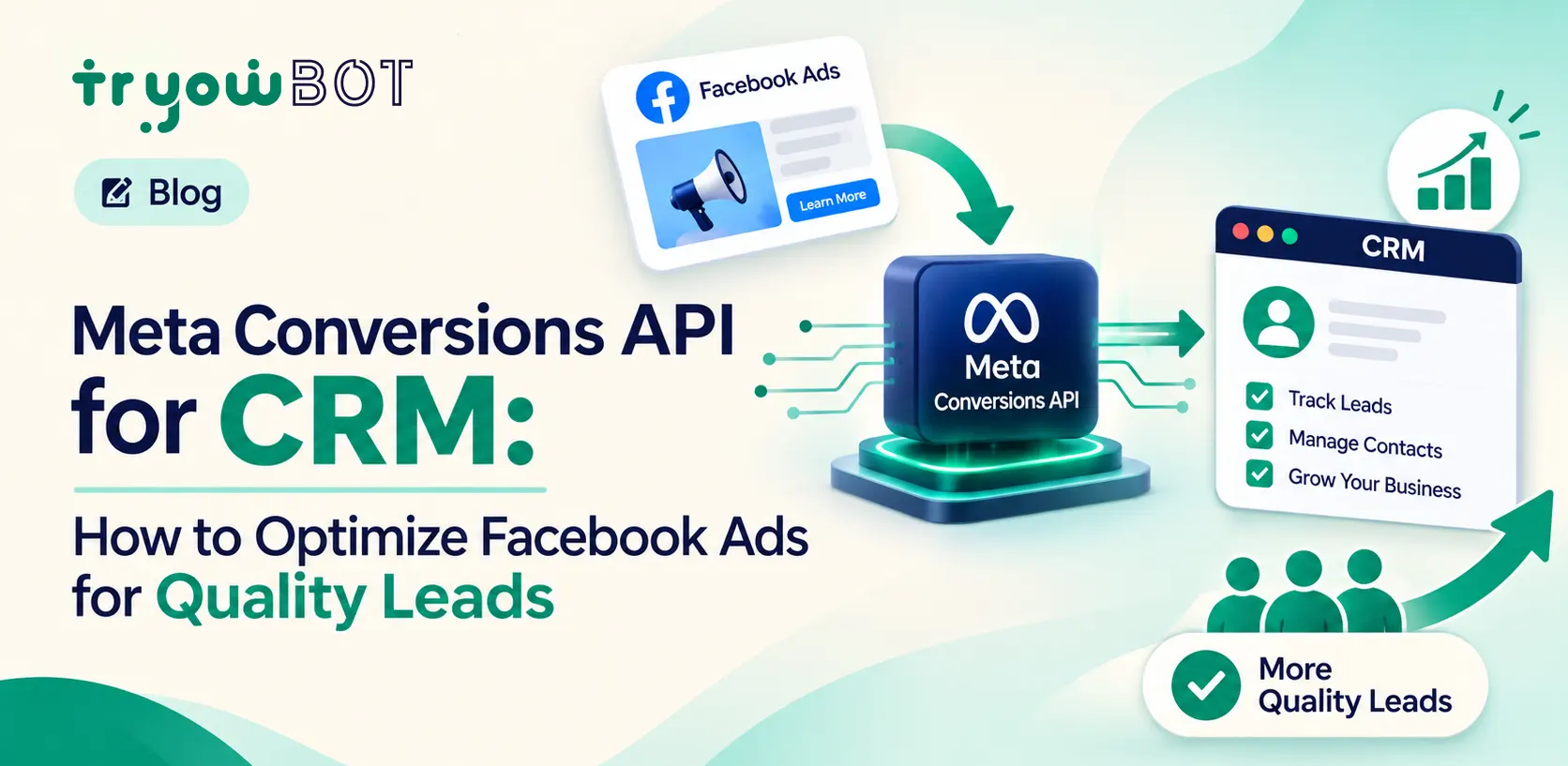
- CRM conversion events are shared with Meta through CAPI.
- Meta can use eligible conversion signals to support campaign optimization.
Meta describes this approach as connecting CRM data with its advertising systems to help optimize for lead quality rather than simply lead volume. Meta Blueprint.
Why Are Facebook Ads Generating Leads but Not Enough Customers?
Many businesses evaluate advertising performance using metrics such as impressions, clicks, cost per click and cost per lead.
These metrics are useful, but they do not tell the complete sales story.
Consider this example:
A business spends ₹20,000 on Facebook Ads and receives 100 enquiries.
| Metric Campaign A | |
| Advertising spend | ₹20,000 |
| Total enquiries | 100 |
| Cost per lead | ₹200 |
| Qualified leads | 15 |
| Customers acquired | 3 |
Now imagine another campaign with the same advertising budget.
| Metric Campaign B | |
| Advertising spend | ₹20,000 |
| Total enquiries | 50 |
| Cost per lead | ₹400 |
| Qualified leads | 30 |
| Customers acquired | 10 |
Campaign A generates more enquiries at a lower cost per lead. However, Campaign B generates more qualified leads and customers.
This illustrates why businesses should not judge advertising success using lead volume alone.
Without a proper CRM process and conversion tracking, businesses may struggle to understand:
- Which advertising campaigns generate serious enquiries?
- Which leads meet the business's requirements?
- Which leads progress to sales opportunities?
- Which campaigns generate actual customers?
- Where are potential customers dropping out of the sales process?
A CRM integrated with Meta Conversions API can help connect advertising activity with these downstream sales outcomes.
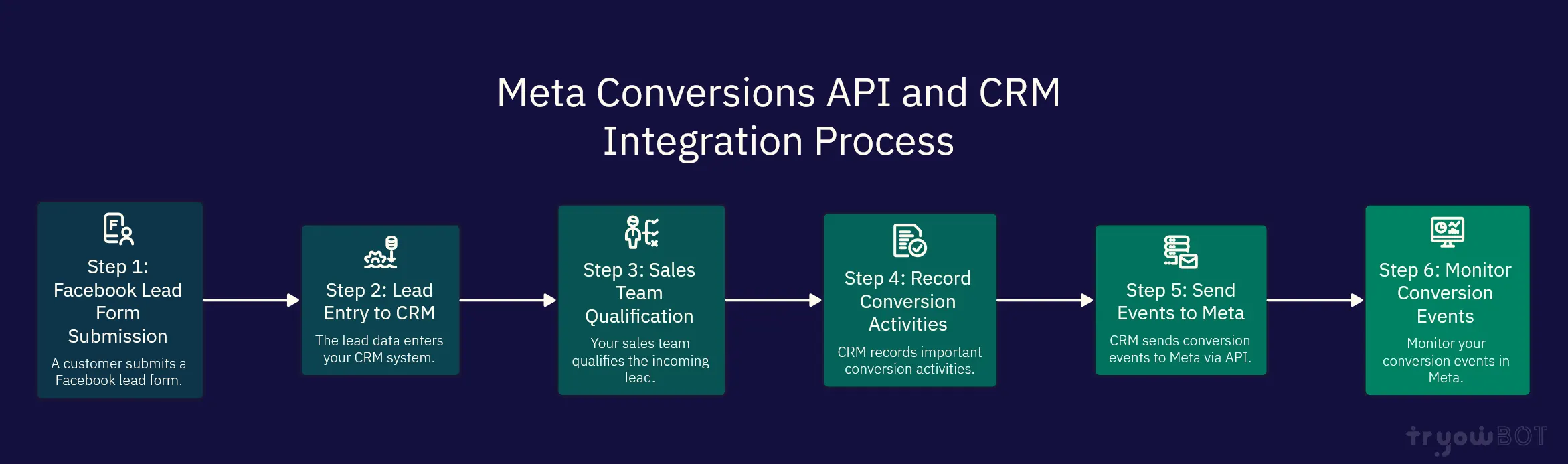
How Does Meta Conversions API Work with CRM?
The process connects your advertising campaigns with the actual activities happening inside your business.
Here is a simplified example:
Step 1: A Customer Submits a Facebook Lead Form
A potential customer sees your Facebook or Instagram advertisement and submits an instant lead form.
The form may collect information such as:
- Customer name
- Mobile number
- Email address
- Product or service requirement
- Location
- Additional enquiry details
Step 2: The Lead Enters Your CRM
The lead information is transferred into your CRM through the configured Meta lead integration.
Your sales team can access the enquiry, review the submitted information and begin the follow-up process.
Keeping leads in a central CRM also reduces the need to manually collect enquiries from different advertising accounts.
Step 3: Your Sales Team Qualifies the Lead
The sales representative contacts the customer and understands their actual requirements.
For example, a lead may be evaluated based on:
- Customer requirement
- Budget
- Purchase timeline
- Decision-making authority
- Interest in the product or service
Based on this interaction, the sales team updates the lead's status in the CRM.
This is an important step because the business now has more meaningful information than the original form submission.
Step 4: CRM Records Important Conversion Activities
As the customer progresses through the sales process, the CRM records relevant activities and status changes.
For example:
- Lead Created
- Lead Qualified
- Deal Won
These are illustrative CRM events. Your actual event mapping should match the events supported by your CRM integration and the conversion events configured in Meta.
Step 5: CRM Sends Conversion Events to Meta
When a configured conversion activity occurs, the CRM can send the relevant event information to Meta through Conversions API.
Meta can then receive information about what happened after the initial enquiry.
Step 6: Monitor Your Conversion Events
Businesses should verify that events are being received correctly through Meta Events Manager.
This helps identify integration issues and confirm that the expected conversion signals are reaching Meta.
The important point is that the CRM records the business outcome, while CAPI communicates the configured conversion event to Meta.
How Does CRM Conversion Data Help Improve Facebook Ad Quality?
The biggest advantage of connecting CRM conversion data with Meta is that businesses can provide information about what happens after someone submits an enquiry.
Let's understand the main benefits.
1. Optimize for Qualified Leads Instead of Only Form Submissions
A form submission does not always indicate purchase intent.
For example, a person may submit a form simply to understand the price of a product. Another person may have a genuine requirement and be ready to purchase.
When the CRM records lead qualification and shares the appropriate conversion signals, Meta can receive information about which leads progressed beyond the initial enquiry.
With the right campaign objective and conversion optimization configuration, advertisers can use these signals to optimize towards more valuable leads.
2. Understand Which Advertising Campaigns Generate Customers
Not every campaign delivers the same business results.
One campaign may generate many enquiries but very few customers. Another may generate fewer enquiries but a higher number of successful sales.
By connecting CRM conversion activity with Meta, businesses can build a clearer understanding of the relationship between advertising campaigns and downstream outcomes.
This helps marketing teams evaluate campaigns using more meaningful performance indicators.
3. Improve Advertising Decisions Using Actual Sales Data
CRM data gives business owners a clearer picture of how enquiries move through the sales process.
Instead of making decisions only from clicks and form submissions, businesses can also consider:
- Number of qualified leads
- Number of deals created
- Number of successful sales
- Conversion rate from lead to customer
- Cost per qualified lead
- Cost per customer acquired
These measurements help businesses identify where advertising and sales processes need improvement.
4. Reduce Dependence on Browser-Only Tracking
Browser-based tracking may not capture every relevant customer interaction.
Conversions API provides a server-side method for sharing eligible events with Meta.
However, CAPI should not be treated as a guaranteed way to recover every missing conversion. Correct event configuration, customer matching information, permissions and data quality still matter.
5. Connect Marketing and Sales Teams
Marketing teams generate enquiries, while sales teams work to convert those enquiries into customers.
Without a connected system, both teams may evaluate success differently.
Marketing may focus on the number of leads generated, while sales may focus on the number of deals closed.
A CRM integrated with CAPI helps create a more connected measurement process, where advertising activity can be evaluated alongside sales progress.
What Information Does Meta Conversions API Need?
For conversion events to be useful, the information sent to Meta must be accurate and correctly structured.
Depending on the event type and integration, important information may include:
| Information Purpose | |
| Event Name | Identifies the conversion activity |
| Event Time | Records when the activity occurred |
| Action Source | Identifies where the event took place |
| Customer Information | Helps match the event to a Meta user |
| Event ID | Helps identify and deduplicate events where applicable |
| Dataset ID | Identifies the destination dataset |
Customer matching information may include email addresses, phone numbers and other supported identifiers.
Some customer information, such as email and phone number, must be normalized and hashed according to Meta's requirements before transmission. Other identifiers have different handling requirements.
Businesses should follow Meta's current technical documentation rather than assuming every field is treated the same way.
It is equally important to collect and share customer information only when permitted under applicable privacy requirements, your privacy policy and the relevant consent or legal basis.
For detailed technical requirements, refer to the Meta Conversions API Parameters Documentation.
How to Set Up Meta Conversions API with Your CRM
Setting up the integration requires coordination between your Meta advertising account and CRM system.
Here is a practical overview.
Step 1: Prepare Your Meta Business Account
Before configuring the integration, make sure you have the necessary administrative access to your Meta Business account and Events Manager.
You will generally need:
- Access to the relevant Meta business assets
- A dataset or pixel selected for the integration
- The required access token
- Permission to configure the conversion integration
Keep access tokens secure and avoid sharing them through public documents or unsecured communication channels.
Step 2: Connect Meta Lead Forms to Your CRM
If you are running instant lead form campaigns, configure the Meta lead integration to bring enquiries into your CRM.
Make sure that:
- The correct Facebook Page is connected.
- The required lead forms are selected.
- Form questions are mapped to the correct CRM fields.
- The correct lead source is assigned.
- A test enquiry successfully appears in the CRM.
This ensures that your sales team has the information needed to manage incoming leads.
Step 3: Configure the Conversion API
Open the Data Conversion API settings in your CRM.
For the TryowBOT CRM integration, the documented setup process includes:
- Create or select a dataset in Meta Events Manager.
- Generate the required Meta access token.
- Open Data Conversion API settings in TryowBOT CRM.
- Enter the dataset ID and access token.
- Map the relevant CRM events to Meta conversion events.
- Review the customer matching information and privacy requirements.
- Trigger a test event.
Step 4: Map CRM Events Correctly
Event mapping determines which CRM activities should be shared with Meta.
For example:
| CRM Activity Example Purpose | |
| Lead Created | Records a new enquiry |
| Lead Qualified | Indicates that an enquiry meets qualification criteria |
| Deal Won | Indicates a successful sales outcome |
These mappings should reflect real business activities. Do not mark every new enquiry as a qualified lead or successful conversion.
Step 5: Test Events in Meta Events Manager
After configuring the integration, trigger test events and check whether they appear in Meta Events Manager.
Verify:
- The correct dataset receives the event.
- The event name is correct.
- The event is received at the expected time.
- Customer matching information is handled correctly.
- Duplicate events are not being unintentionally generated.
Do not assume the integration is working simply because the CRM configuration has been saved.
Step 6: Review Campaign Optimization Settings
Once the integration is working, review the available conversion optimization options in Meta Ads Manager.
For lead generation campaigns, advertisers should choose an appropriate performance goal and conversion event supported by their campaign setup.
For example, a campaign designed to find qualified leads needs an appropriate qualified-lead conversion signal, not simply an initial form submission.
Availability and configuration options can vary depending on the campaign type, account setup and Meta's current advertising features.
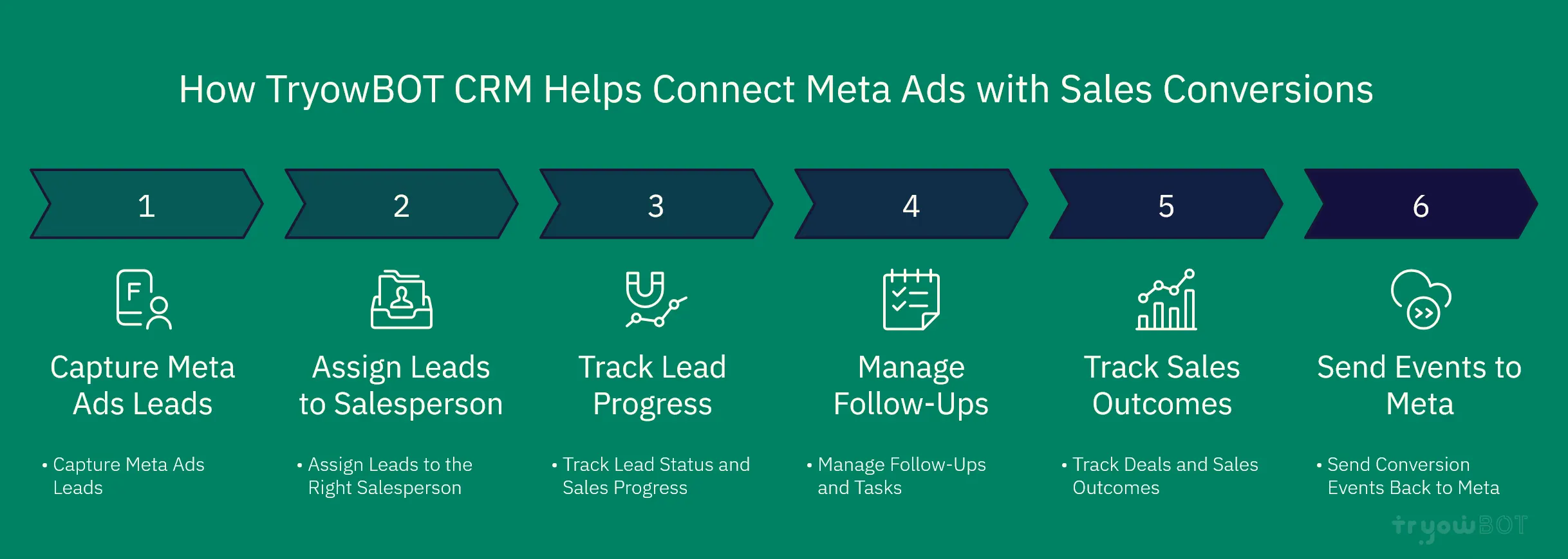
How TryowBOT CRM Helps Connect Meta Ads with Sales Conversions
Capturing leads is only the beginning of the sales process.
Businesses also need a structured way to assign enquiries, track follow-ups, manage opportunities and record successful conversions.
TryowBOT CRM brings these activities together.
Capture Meta Ads Leads
Connect your Meta account and bring Facebook and Instagram lead form submissions into TryowBOT CRM.
Your team can manage incoming enquiries without relying entirely on manual lead entry.
Assign Leads to the Right Salesperson
Incoming leads can be assigned to the appropriate sales representatives.
This helps establish clear ownership and makes it easier for managers to monitor who is responsible for each enquiry.
Track Lead Status and Sales Progress
Keep track of how enquiries progress through your sales process.
Your team can update lead statuses, review customer details and maintain the history of sales activities.
Manage Follow-Ups and Tasks
Sales opportunities can be lost when follow-ups are delayed or forgotten.
TryowBOT CRM helps teams manage tasks, follow-up activities and scheduled actions connected to customer records.
Track Deals and Sales Outcomes
Qualified leads can be converted into deals and tracked through the sales process.
This provides a more complete picture of which enquiries are progressing towards successful sales.
Send Conversion Events Back to Meta
TryowBOT CRM supports Meta Conversion API integration for sending relevant CRM conversion events back to Meta.
This connects recorded CRM conversion activity with Meta's advertising systems through a server-to-server integration.
The result is a more connected process between lead generation, sales management and advertising conversion tracking.
Your CRM records the conversion. CAPI sends the signal.
Explore TryowBOT Meta Ads Lead Management to learn more.
Best Practices for Getting Better Results from Meta Conversions API
Connecting your CRM with Meta is not enough on its own. Businesses need to maintain accurate data and consistent sales processes.
Here are some important practices.
1. Maintain Accurate Lead Information
Incorrect phone numbers, missing email addresses and incomplete customer records can reduce the usefulness of matching information.
Encourage your team to maintain accurate customer details.
2. Define Clear Lead Qualification Criteria
Your sales team should understand what makes an enquiry qualified.
For example, define qualification criteria based on customer needs, budget, authority and purchase timeline.
A consistent process helps ensure that qualified-lead events represent genuine business opportunities.
3. Update CRM Statuses Regularly
If sales representatives forget to update lead statuses, the CRM may not reflect the actual customer journey.
Make status updates part of your daily sales process.
4. Avoid Sending Duplicate Conversion Events
If the same conversion is sent more than once, it can affect measurement.
Where the same event is sent through multiple tracking methods, use Meta's supported event deduplication approach, including consistent event names and event IDs where applicable.
5. Monitor Events Regularly
Check Meta Events Manager to identify missing, delayed or incorrectly configured events.
Also review your CRM records to confirm that the events being shared represent actual customer activity.
6. Protect Customer Data
Customer information must be handled responsibly.
Use secure credentials, limit access to authorized team members and follow applicable privacy and data protection requirements.
7. Evaluate Business Outcomes, Not Just Lead Volume
Review the full sales journey.
Measure qualified leads, deals created, successful sales and cost per customer alongside traditional advertising metrics.
This helps your business make decisions based on actual outcomes rather than enquiry volume alone.
Common Mistakes Businesses Should Avoid
Even with a CRM and Conversions API integration, some mistakes can reduce the value of the setup.
| Common Mistake Why It Matters What to Do | ||
| Tracking only new leads | Does not communicate later sales progress | Map meaningful conversion events |
| Incorrect event mapping | Sends misleading conversion signals | Match events to real CRM activities |
| Incomplete customer information | Can affect event matching | Maintain accurate customer records |
| Duplicate events | Can distort measurement | Implement appropriate deduplication |
| Ignoring test events | Integration issues may go unnoticed | Verify events in Events Manager |
| Delayed CRM updates | Conversion signals may be inaccurate or late | Update sales statuses consistently |
| No qualification criteria | Different agents may classify leads differently | Establish a standard qualification process |
Remember: Conversions API improves the connection between your CRM and advertising platform, but it cannot automatically fix poor targeting, weak offers, slow sales responses or an ineffective sales process.
Frequently Asked Questions
1. What is Meta Conversions API for CRM?
Meta Conversions API for CRM connects customer relationship management data with Meta's advertising systems. It allows businesses to share relevant conversion events, such as qualified leads or successful sales, so that eligible advertising campaigns can use these signals for optimization.
2. How does Meta Conversions API improve lead quality?
It allows businesses to share information about what happens after a person submits an enquiry. When properly configured, Meta can use these downstream conversion signals to help optimize campaigns towards leads more likely to become customers.
3. What is the difference between Meta Pixel and Conversions API?
Meta Pixel is a browser-based tracking tool that sends website activity to Meta. Conversions API sends supported event data directly from a server or connected system. Businesses may use both, with appropriate event deduplication where the same events are shared through both methods.
4. Can a CRM send qualified lead information to Facebook Ads?
Yes. A CRM integrated with Meta Conversions API can send supported conversion events when leads reach configured stages, such as qualification or successful deal conversion. The CRM integration and Meta campaign setup must support the selected events.
5. Do I need a CRM to use Meta Conversions API?
No. Conversions API can be implemented using different technical approaches. However, a CRM is particularly useful for businesses that want to track leads, manage sales activities and share downstream conversion information with Meta.
6. Does Meta Conversions API guarantee better Facebook Ads performance?
No. It provides additional conversion signals that may help Meta optimize advertising campaigns. Actual performance depends on event quality, campaign setup, audience, budget, offer, sales response and other factors.
7. Can TryowBOT CRM send conversion events to Meta?
Yes. TryowBOT CRM supports Meta Conversion API integration. Businesses can configure their Meta dataset ID and access token, map relevant CRM events and verify test events through Meta Events Manager.
8. How can I check whether Meta Conversions API is working?
Use Meta Events Manager to check whether the expected events are received by the correct dataset. Compare these events with your CRM records and verify event names, timing, matching information and duplicate handling.
Conclusion
Generating more Facebook and Instagram leads is not always the best way to grow your business. What matters is how many of those enquiries become genuine sales opportunities and paying customers.
Meta Conversions API helps connect the advertising journey with the actual customer journey recorded in your CRM.
By capturing enquiries, qualifying leads, managing follow-ups, tracking deals and sharing relevant conversion events, businesses can build a more informed approach to advertising optimization.
With TryowBOT CRM, businesses can bring Meta Ads enquiries into one system, manage sales activities and send relevant CRM conversion events back to Meta through CAPI.
Stop measuring advertising success by enquiries alone. Start understanding which leads move your business forward.
Ready to connect your advertising and sales processes?
Explore TryowBOT CRM and discover a more connected way to manage Meta Ads leads and conversions.