Introduction
Facebook and Instagram advertising have become important lead-generation channels for businesses. With Meta Ads, businesses can reach targeted audiences, promote their products and services, and collect enquiries through instant lead forms.
However, generating enquiries is only the first part of the sales process.
What happens after someone submits a lead form?
Sales teams often need to download lead details, transfer them into spreadsheets, distribute enquiries among sales representatives and remember to follow up. When these activities depend on manual work, leads can be overlooked, follow-ups can be delayed, and businesses may struggle to understand which advertising campaigns are generating actual customers.
This is where connecting Meta Ads with a Customer Relationship Management (CRM) system becomes valuable.
By integrating Facebook and Instagram lead forms with TryowBOT CRM, businesses can bring incoming enquiries directly into their lead management process. They can organise lead information, assign sales representatives, automate follow-up activities, track sales progress and send conversion events back to Meta.
In this guide, we will explore how this process works and how businesses can manage their Meta advertising leads more effectively.
1. Why Connect Meta Ads with a CRM?
Running advertisements and collecting enquiries are not enough to build a consistent sales process. Every enquiry needs to be recorded, assigned and followed up.
Without CRM integration, businesses may face several challenges:
- Manual lead collection: Sales teams may need to download lead information and enter it into another system.
- Delayed responses: Enquiries can remain unattended while employees transfer or distribute lead details.
- Unorganised lead ownership: Multiple sales representatives may be unsure who is responsible for contacting a customer.
- Limited lead tracking: It becomes difficult to understand whether an enquiry is new, contacted, qualified or converted.
- Unclear advertising performance: A campaign may generate many enquiries, but businesses may not know how many eventually become customers.
A CRM integration creates a connected process between advertising and sales.
Instead of treating every Meta lead as an isolated form submission, businesses can manage it as the beginning of a complete customer acquisition journey.
2. Automatically Capture Facebook and Instagram Leads in Your CRM
One of the most important steps is bringing Meta lead form submissions directly into the CRM.
Meta Lead Ads allow people to submit their contact details through forms on Facebook and Instagram without necessarily visiting an external website.
With TryowBOT CRM's Meta Ads lead form integration, businesses can connect their Facebook Page and relevant lead forms to receive these enquiries in their CRM.
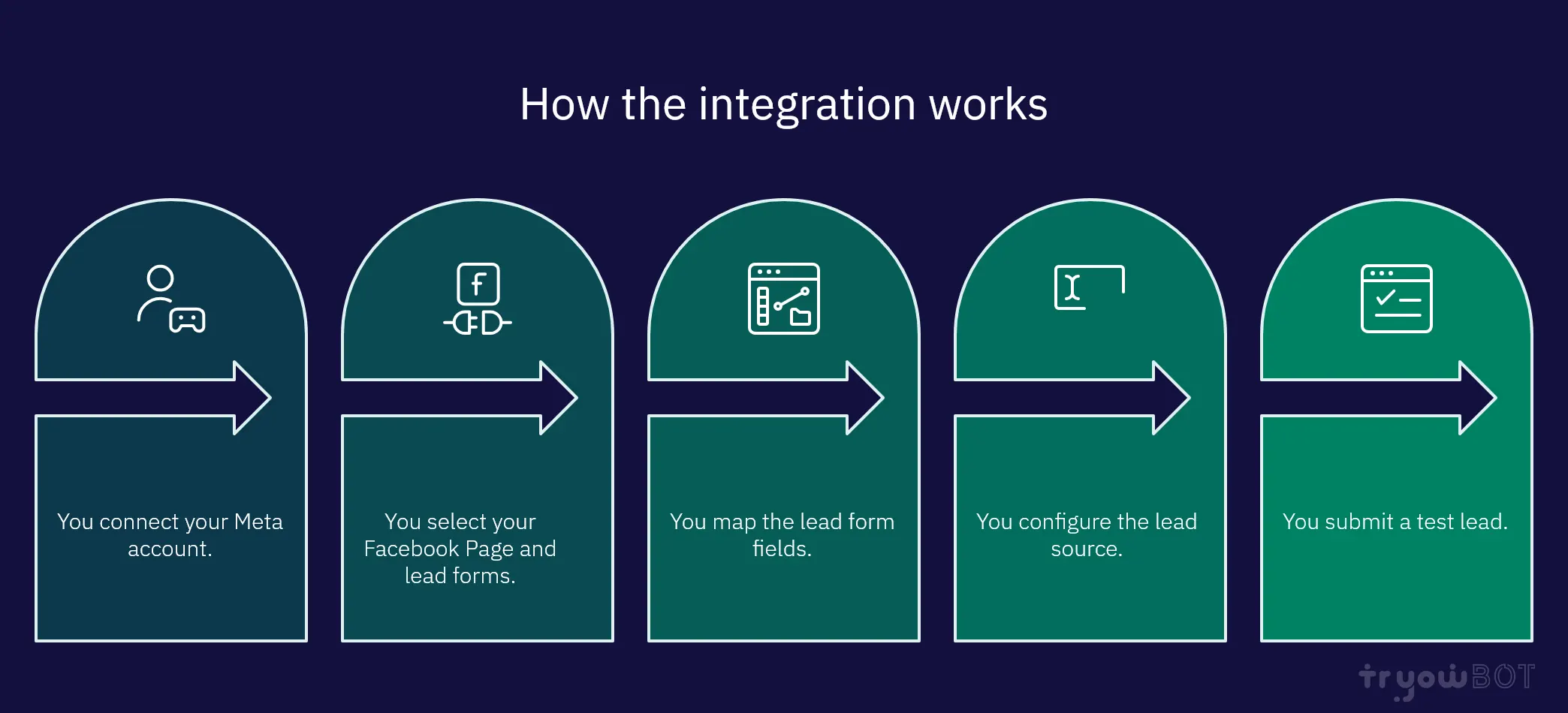
How the Integration Works
Step 1: Connect Your Meta Account
Open the Meta integration area in TryowBOT CRM and select Connect. Sign in to the Meta account that manages your advertising Page and approve the requested permissions.
Step 2: Select Your Facebook Page and Lead Forms
Choose the relevant Facebook Page and the lead forms that should send enquiries into the CRM.
Step 3: Map the Lead Form Fields
Match the questions in your Meta lead form with the corresponding CRM fields.
For example:
| Meta Lead Form Field CRM Field | |
| Full Name | Client Name |
| Phone Number | Mobile Number |
| Email Address | Email Address |
| Company Name | Company Name |
| Additional Questions | Custom Fields |
Step 4: Configure the Lead Source
Choose the appropriate default lead source, such as Facebook and Instagram Ads, and select the relevant group.
This helps distinguish advertising enquiries from leads received through other channels.
Step 5: Submit a Test Lead
Use Meta's lead ads testing tool to submit a test enquiry. Open the CRM lead list and verify that the record appears with the correct contact information, source and mapped fields.
Once the connection is configured and tested, incoming submissions from the connected forms can enter the CRM lead management process.
3. Organise and Track Every Advertising Lead
Capturing leads is only useful when the sales team can understand and manage them.
In TryowBOT CRM, incoming Meta enquiries appear in Lead Management, where users can search, filter, organise and review customer information.
Each lead record can contain:
- Customer name and contact details.
- Company information, where available.
- Lead source and group.
- Current lead status.
- Assigned sales representative.
- Next follow-up date.
- Notes and customer requirements.
- Recent activity and interaction history.
Track Leads Using Their Sales Status
A lead status helps sales representatives understand where each enquiry stands.
For example, a business can organise its sales process using stages such as:
| Lead Status Meaning | |
| Open / New | A new advertising enquiry has been received. |
| Engaged / Contacted | The sales team has attempted to contact the customer. |
| Qualified | The customer meets the business's sales qualification criteria. |
| Proposal / Negotiation | The opportunity is progressing towards a purchase. |
| Closed – Won | The customer has successfully converted. |
| Closed – Lost | The opportunity did not result in a sale. |
The exact stages can be configured according to the organisation's sales process.
This makes it easier to identify new enquiries, monitor sales progress and understand where potential customers are dropping out.
4. Automatically Assign New Meta Leads to Sales Representatives
When advertising campaigns generate multiple enquiries, distributing them among sales representatives becomes an important responsibility.
Manual assignment can create unnecessary delays, especially when several people handle incoming leads.
TryowBOT CRM supports different lead assignment methods, including:
- Manual Assignment: An administrator selects the appropriate sales representative for an individual lead.
- Bulk Assignment: Multiple selected leads can be assigned to a sales representative.
- Automatic Assignment: Leads can be distributed according to configured source or group rules.
- Round-Robin Assignment: Leads can be distributed in rotation among a selected group of agents.
- Acceptance-Based Assignment: Assigned leads can appear under Pending Accepts until the representative accepts them.
Example: Assigning Facebook and Instagram Leads Automatically
A business running multiple advertising campaigns can configure a rule such as:
| Lead Source Assignment | |
| Facebook and Instagram Ads | Ads Follow-up Team |
| Website Enquiries | Web Sales Team |
| Referral Leads | Senior Sales Representative |
For Meta advertising leads, an automatic assignment rule can direct incoming enquiries to the appropriate sales team.
Assignment history also helps administrators review ownership changes and understand which representative was responsible for a particular enquiry.
This creates clearer accountability and reduces the possibility of leads remaining without an owner.
5. Automate Lead Follow-Ups with CRM Workflows
Receiving an enquiry and assigning it to a salesperson are important steps. However, the next challenge is ensuring that the customer receives timely attention.
TryowBOT CRM provides workflow automation that can respond to configured lead events and perform actions automatically.
For Meta advertising leads, a workflow can be configured using the Lead Created (Source) trigger.
Example: Facebook and Instagram Lead Follow-Up Workflow
Trigger: Lead Created (Source: Facebook and Instagram Ads)
Actions:
- Assign Lead to the Ads Follow-up Team.
- Send an approved WhatsApp greeting template.
- Wait for one day.
- Create a follow-up call task for the assigned sales representative.
Expected Workflow:
Meta Lead Form Submission → CRM Lead Created → Automatic Assignment → WhatsApp Template → Follow-up Task
This process helps sales teams respond to new enquiries and maintain a clear follow-up schedule.
The WhatsApp action requires an active WhatsApp integration, an approved template and the appropriate customer consent.
Why Follow-Up Automation Matters
- Reduces repetitive manual work.
- Helps sales teams respond more consistently.
- Creates follow-up tasks automatically.
- Makes lead ownership clearer.
- Reduces the chance of enquiries being overlooked.
Workflows should always be tested before enabling them for live leads. Businesses should also check for duplicate triggers to avoid sending repeated messages or creating duplicate tasks.
6. Qualify Advertising Leads and Convert Them into Sales Opportunities
Not every person who submits a Meta lead form is ready to purchase.
Some people may be researching a product, comparing prices or simply exploring available services.
Therefore, businesses need a process to identify genuine sales opportunities.
TryowBOT CRM allows sales representatives to update lead statuses, record customer interactions and use Lead Score insights to help prioritise enquiries.
Understand Lead Quality
Sales representatives can evaluate an enquiry using important qualification factors:
- Need: Does the customer have a requirement for the product or service?
- Budget: Is the customer's budget aligned with the offering?
- Authority: Is the person involved in the purchasing decision?
- Timeline: When does the customer intend to make a purchase?
- Engagement: Has the customer responded to calls, emails or messages?
TryowBOT CRM also provides a Lead Score view with a percentage score, lead temperature label and suggested next steps.
These insights help representatives prioritise their work, but the final qualification decision should remain with the sales team.
Convert Qualified Leads into Deals
When a lead becomes a genuine sales opportunity, the representative can use the Convert to Deal option in the lead profile.
The process includes:
- Review the lead information and communication history.
- Confirm that the lead meets the organisation's qualification criteria.
- Select Convert to Deal.
- Enter the deal date, amount and notes.
- Confirm the deal owner and save.
The opportunity then becomes part of Deals Management, where businesses can track its progress and update the outcome as Won or Lost.
This creates a connection between the original advertising enquiry and the resulting sales opportunity.
7. Send Conversion Events Back to Meta Using the Data Conversion API
Capturing leads from Meta Ads is one direction of the integration. Businesses can also send conversion information from their CRM back to Meta.
This is where the Data Conversion API becomes important.
A lead form submission tells a business that someone has expressed interest. However, it does not necessarily mean that the person has become a customer.
For better advertising measurement, businesses may want to distinguish between different stages of the sales journey.
For example:
- Lead Created
- Lead Qualified
- Deal Won
TryowBOT CRM supports mapping CRM events to Meta conversion events through its Data Conversion API integration.
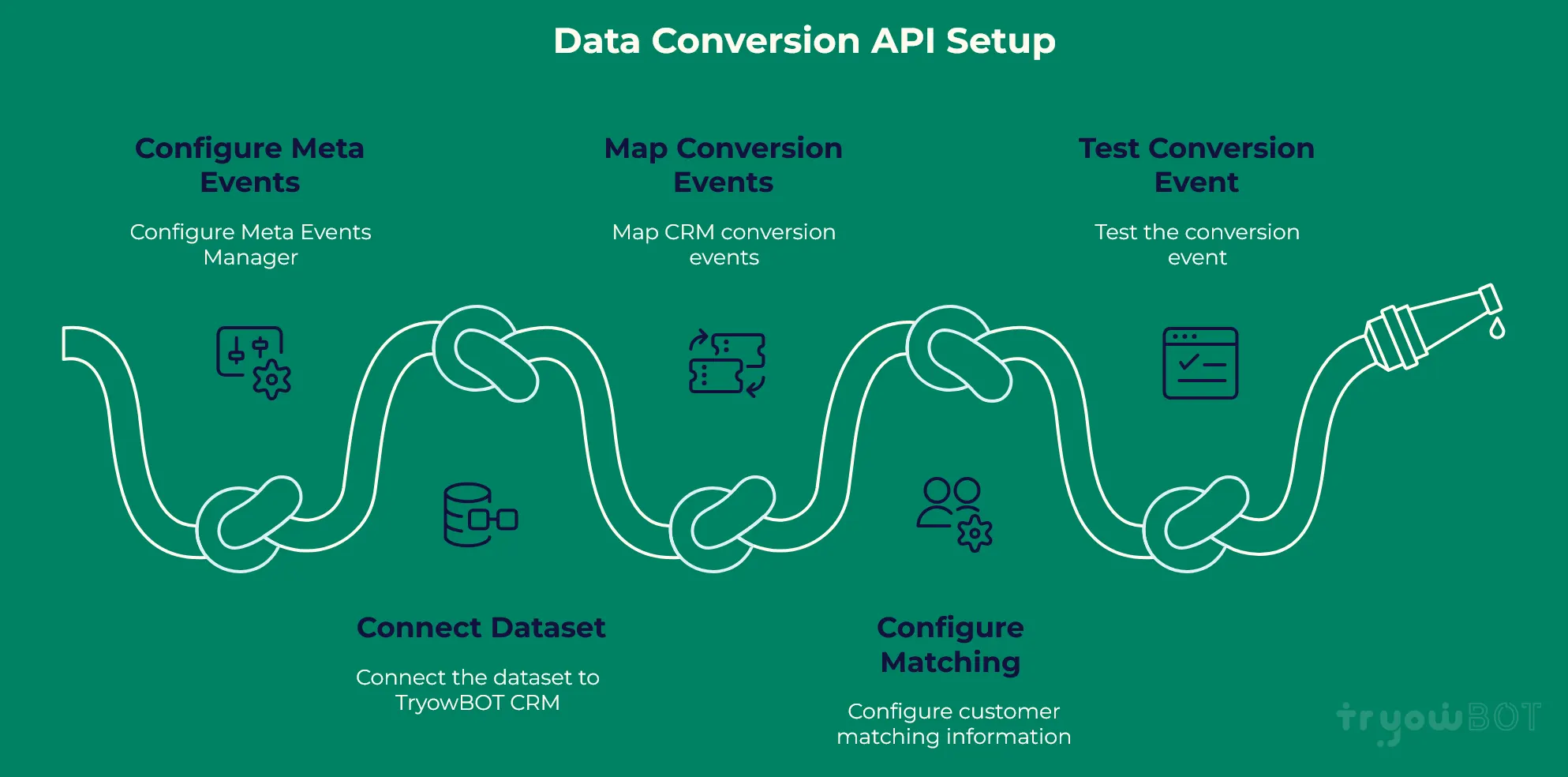
How the Data Conversion API Works
Step 1: Configure Meta Events Manager
Create or select the relevant dataset (pixel) in Meta Events Manager and generate an access token.
Step 2: Connect the Dataset to TryowBOT CRM
Open the Data Conversion API settings in the CRM and enter the required dataset ID and access token.
Step 3: Map CRM Conversion Events
Configure the relevant CRM events, such as Lead Created, Qualified and Deal Won, to the appropriate Meta conversion events.
Step 4: Configure Customer Matching Information
Verify the matching information being sent, such as hashed email addresses and phone numbers, in accordance with your privacy policy and applicable customer consent.
Step 5: Test the Conversion Event
Trigger a test event and verify that it appears in Meta Events Manager.
Why Send Conversion Events to Meta?
Connecting downstream sales events with Meta provides additional information about what happens after someone submits an advertisement form.
Rather than looking only at the number of enquiries, businesses can work towards understanding which advertising activity generates qualified opportunities and successful sales.
When the relevant events are correctly configured and used by Meta's measurement and optimisation systems, this information can support more informed advertising decisions.
8. Measure Lead Quality and Advertising Performance
A successful advertising campaign should not be evaluated only by the number of leads it generates.
Businesses should also understand how many enquiries are contacted, qualified and eventually converted.
TryowBOT CRM provides lead and sales reporting that helps businesses review these outcomes.
Important Metrics to Monitor
| Metric What It Helps You Understand | |
| Total Leads | Number of leads received during a selected period. |
| Untouched Leads | Enquiries that have not yet received a recorded first contact. |
| Touched Leads | Leads with a recorded contact attempt. |
| Lead Source | Which channels generate enquiries. |
| Qualified Leads | Leads that meet the organisation's qualification criteria. |
| Deals Won | Number of successfully closed sales opportunities. |
| Revenue by Source | Revenue generated by different lead sources. |
| Lead Aging | How long leads have remained in the sales process. |
Example: Evaluating Facebook and Instagram Advertising Leads
Imagine a business receives 100 enquiries from its Meta advertising campaigns.
Its sales team can review the following illustrative results:
| Sales Stage Number of Leads | |
| Total Leads Received | 100 |
| Contacted Leads | 85 |
| Qualified Leads | 40 |
| Converted to Deals | 25 |
| Deals Won | 15 |
These figures are illustrative, not actual campaign results.
The business can use this information to identify where leads are being lost.
For example:
- If many leads remain untouched, the team should review its first-contact process.
- If many leads are contacted but few qualify, the business should review its targeting and lead form questions.
- If many leads qualify but few deals are won, the sales team should review its proposal and closing process.
TryowBOT CRM also provides Revenue by Source reporting, helping businesses compare advertising lead volume with the revenue generated from those sources.
The important point is to measure the complete journey from enquiry to sale, not just the number of form submissions.
9. Common Problems to Check When Connecting Meta Ads with CRM
Even after connecting an integration, businesses should verify that data is reaching the CRM correctly.
Here are some common issues and their solutions.
| Problem Possible Reason Recommended Action | ||
| Meta leads are not appearing | Expired access token or incorrect Page permissions. | Reconnect the Meta account and verify Page and form permissions. |
| Lead information is incomplete | Incorrect field mapping. | Review the form-to-CRM field mapping. |
| Duplicate leads appear | Repeated submissions or integration retries. | Check duplicate records and prevent repeated lead creation. |
| Leads have the wrong source | Incorrect source configuration. | Review the default source and mapping rules. |
| Leads remain unassigned | No matching assignment rule or fallback owner. | Configure the appropriate assignment rules. |
| WhatsApp follow-up fails | Template not approved, invalid number or inactive integration. | Check template approval, recipient details and integration status. |
| Conversion events are missing in Meta | Incorrect dataset ID, token or event mapping. | Verify Data Conversion API credentials and test events in Events Manager. |
It is also important to run integration checks after changing permissions, forms, credentials or field mappings.
For critical integrations, regular verification helps identify problems before they affect live advertising enquiries.
Conclusion
Generating leads through Facebook and Instagram advertising is only the beginning of customer acquisition. Businesses also need a reliable process to capture enquiries, organise customer information, assign ownership, follow up consistently and measure actual sales outcomes.
Connecting Meta Ads with CRM software brings these activities into one connected process.
With TryowBOT CRM, businesses can capture Facebook and Instagram lead form submissions, organise enquiries, configure automatic lead assignment, create follow-up workflows, qualify prospects, convert opportunities into deals and send selected conversion events back to Meta through the Data Conversion API.
This helps businesses move beyond simply collecting advertising leads and build a more organised approach to managing and converting them.
Turn your Meta advertising enquiries into organised sales opportunities with TryowBOT CRM.
CTA: Explore TryowBOT CRM
Frequently Asked Questions
1. Can Facebook and Instagram leads automatically enter a CRM?
Yes. With a properly configured Meta Lead Ads integration, Facebook and Instagram lead form submissions can be sent directly into a connected CRM. The Meta account, Page permissions, lead forms and field mappings must be configured correctly.
2. What information can be captured from Meta Lead Ads?
Depending on the questions included in the lead form, information such as customer name, mobile number, email address, company name and additional answers can be mapped to the corresponding CRM fields.
3. Can Meta advertising leads be automatically assigned to sales agents?
Yes. TryowBOT CRM supports automatic lead assignment using source or group rules. Businesses can also configure round-robin assignment where supported to distribute leads among sales representatives.
4. Can CRM workflows automatically follow up with Facebook leads?
Yes. TryowBOT CRM supports workflows triggered by new leads from Facebook and Instagram Ads. Configured actions can include assigning the lead, sending an approved WhatsApp template and creating a follow-up task.
5. What is the difference between Meta Lead Ads integration and Meta Conversions API?
Meta Lead Ads integration brings customer enquiry information from Facebook and Instagram lead forms into the CRM.
Meta Conversions API sends selected conversion events from the CRM back to Meta, helping businesses connect their sales outcomes with advertising measurement.
6. How can businesses identify which Meta Ads generate actual customers?
Businesses can track lead sources, qualification statuses, deal outcomes and revenue by source in their CRM. When downstream conversion events are also configured through the Data Conversion API, those events can provide additional information to Meta.
7. How can I check whether my Meta Ads CRM integration is working?
Submit a test lead using Meta's lead ads testing tool. Verify that the CRM creates exactly one lead, maps the correct contact details, records the expected source and applies the configured assignment and workflow actions. For conversion events, check Meta Events Manager.